How to Print ABS Filament on Open Frame 3D Printer: Draft Shield Guide

Printing ABS filament on an open frame 3D printer can be optimized using a draft shield to maintain temperature stability.
Understanding ABS Filament
ABS, or Acrylonitrile Butadiene Styrene, is a popular thermoplastic known for its strength and durability. It is widely used in 3D printing due to its ability to withstand high temperatures and its impact resistance.
This material is particularly favored for functional prototypes, automotive parts, and toys due to its excellent mechanical properties.
Chemical Composition of ABS
The chemical structure of ABS consists of three main components: acrylonitrile, butadiene, and styrene. Each component contributes specific properties, influencing the filament's overall characteristics.
Acrylonitrile provides chemical resistance and thermal stability, while butadiene enhances impact resistance. Styrene improves processability and appearance.
Challenges of Printing ABS on Open Frame Printers
Open frame printers are susceptible to environmental factors, leading to challenges when printing ABS. One major issue is warping, often caused by rapid cooling.
Without proper temperature control, ABS can contract unevenly, resulting in distorted or failed prints.
Additionally, layer adhesion can be compromised if the temperature drops during the printing process. This can lead to structural weaknesses in the final product.
Importance of a Draft Shield
A draft shield acts as a barrier, helping maintain a consistent ambient temperature around the print area. This minimizes the risk of warping and enhances adhesion between layers.
Using a draft shield is crucial for successful ABS prints, particularly in environments with fluctuating temperatures.
Furthermore, a draft shield can help reduce the effects of drafts and air currents, which can adversely affect print quality.
Preparing Your 3D Printer for ABS Printing
Before starting the printing process, several preparations are necessary. Ensure the printer’s bed is level and clean to promote good adhesion.

Leveling the bed typically involves adjusting the height at each corner and the center, ensuring uniform distance from the nozzle.
Use a piece of paper to gauge the nozzle's distance from the bed, ensuring a slight drag when moving the paper.
Recommended Settings for ABS Printing
When configuring printing settings, several key parameters should be adjusted for optimal results. Start by setting the nozzle temperature between 220°C and 250°C, depending on the specific ABS filament used.
Setting the bed temperature to around 100°C helps in reducing warping and improving layer adhesion.
Consider using a heated enclosure if available, as it can further stabilize the temperature around the print.
Step-by-Step Guide to Printing ABS with a Draft Shield
- Gather necessary materials, including ABS filament, a 3D printer, and a draft shield.
- Prepare the 3D printer by leveling the bed and cleaning the build surface.
- Configure the slicer settings in your software, such as how to use cura slicer.
- Set the nozzle and bed temperatures appropriately.
- Install the draft shield around the printer to create a stable environment.
- Load the ABS filament and initiate the print job.
- Monitor the print for any signs of warping or adhesion issues.
- Once printing is complete, allow the model to cool before removing it from the bed.
Utilizing the right settings and tools can significantly improve print quality.
Comparative Overview: ABS vs. Other Filaments
| Filament Type | Strength | Flexibility | Temperature Resistance | Ease of Printing |
|---|---|---|---|---|
| ABS | High | Moderate | High (up to 100°C) | Moderate |
| PLA | Moderate | Low | Low (up to 60°C) | Easy |
| PETG | Moderate | Moderate | Moderate (up to 80°C) | Moderate |
Each filament exhibits unique characteristics, impacting suitability for different applications. For a deeper understanding of material properties, explore the difference between pla and abs and the petg vs pla filament comparisons.
Cleaning the Nozzle for ABS Printing
A clean nozzle is vital for successful prints. Over time, residue can build up, affecting filament flow.
Regular maintenance can prevent clogs and ensure consistent extrusion.
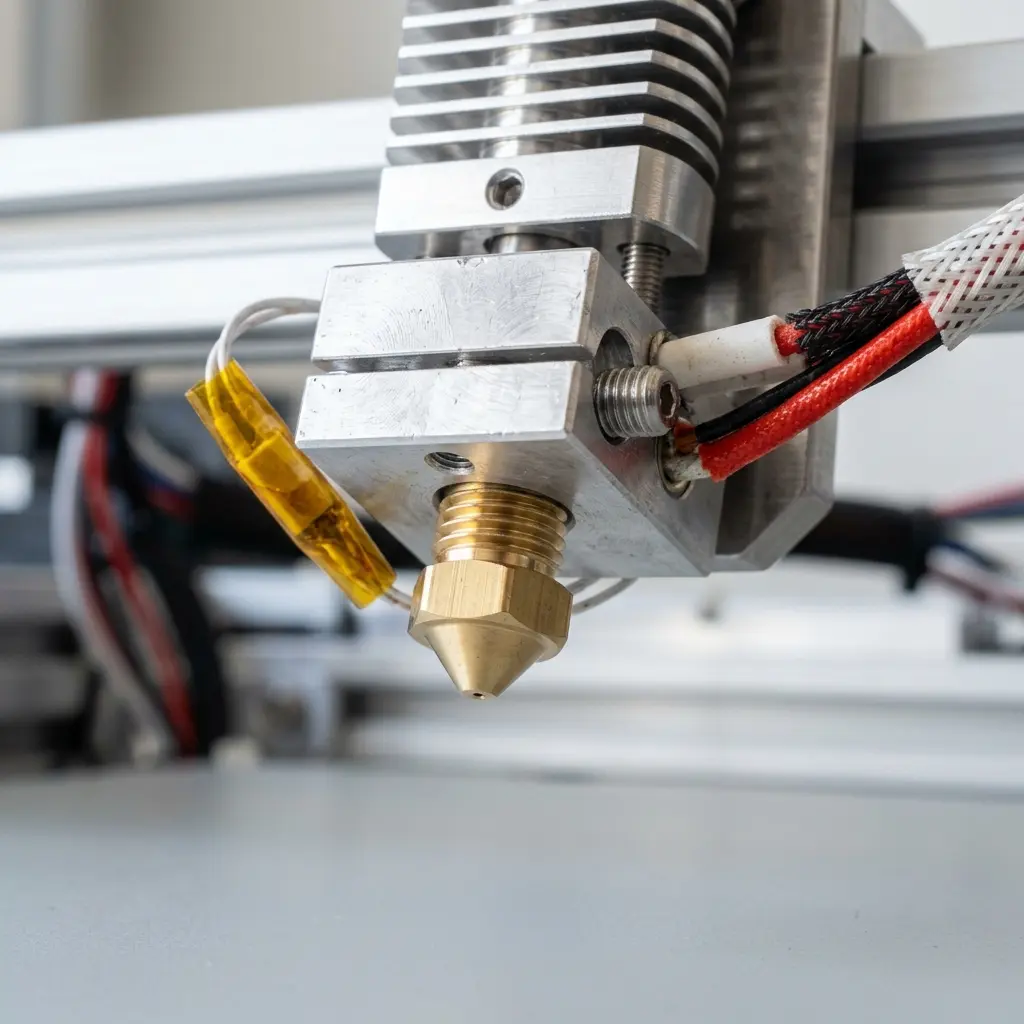
To clean the nozzle, heat it to the filament's melting temperature and manually extrude some filament. This method helps dislodge any debris.
For deeper cleaning, consider using a cleaning filament or a nozzle cleaning kit designed specifically for 3D printers.
Monitoring and Adjusting During Printing
While printing, monitoring the process can help catch issues early. Watch for signs of warping or poor adhesion and be ready to make adjustments if necessary.
Fine-tuning parameters such as print speed, layer height, and cooling settings can significantly impact print quality.
DomineTec Tip: Consider using an enclosure for your open frame printer to further stabilize temperature fluctuations when printing ABS.
Checklist for Successful ABS Printing
- Ensure the printer bed is level and clean.
- Set the nozzle temperature correctly (220°C to 250°C).
- Set the bed temperature (around 100°C).
- Use a draft shield or enclosure to minimize temperature changes.
- Monitor the print for warping or adhesion issues.
- Clean the nozzle regularly to prevent clogs.
Common Issues and Solutions in ABS Printing
Warping
Warping is a common issue when printing ABS. It occurs due to uneven cooling and can be exacerbated by drafts.
Solution: Use a draft shield and ensure the heated bed is set to the appropriate temperature.
Layer Separation
Layer separation can occur if the adhesion between layers is insufficient. This often results in a weak final product.
Solution: Increase the bed temperature and ensure the nozzle temperature is optimal for the filament used.
Stringing
Stringing may occur when excess filament oozes from the nozzle during travel moves.
Solution: Adjust retraction settings in the slicer software to minimize this effect.
Frequently Asked Questions
What is the ideal temperature for printing ABS?
The ideal nozzle temperature for ABS typically ranges from 220°C to 250°C, while the bed temperature should be around 100°C.
Can ABS be printed without a draft shield?
While it is possible to print ABS without a draft shield, doing so increases the likelihood of warping and other print defects.
How do I prevent warping when printing ABS?
To prevent warping, ensure the bed is heated, maintain a consistent ambient temperature, and consider using a draft shield or enclosure.
Is ABS safe for indoor printing?
ABS emits fumes during printing, which can be harmful in poorly ventilated areas. Ensure proper ventilation when printing indoors.
How does ABS compare to PLA?
ABS offers greater strength and temperature resistance compared to PLA, but PLA is easier to print and environmentally friendly.




