
Finding affordable Node.js hosting can be a challenge, but there are excellent options available for budget-conscious developers. As the popularity of Node.js continues to surge, many developers are seeking reliable yet inexpensive hosting solutions to deploy their applications. The right hosting provider not only supports Node.js environments but also ensures performance, scalability, and ease of use.
Whether you are developing a small project or a full-fledged application, understanding the hosting landscape is important for making informed decisions. In this blog post, we will explore the best cheap Node.js hosting providers, focusing on VPS and PaaS options, while also providing alternatives to popular services like Heroku.
Understanding Web Servers and Hosting in the Context of Node.js
Web servers play a significant role in the online ecosystem by delivering content, applications, and services to users across the internet. Hosting solutions can be categorized primarily into two types: Virtual Private Servers (VPS) and Platform as a Service (PaaS).
Each of these categories caters to different needs and offers unique advantages for Node.js applications. VPS hosting, for example, provides users with a dedicated slice of a physical server, allowing for greater control and flexibility over the environment.
This is particularly beneficial for developers who require specific configurations or need to run multiple applications simultaneously.
On the other hand, PaaS solutions offer a more streamlined deployment process by abstracting much of the infrastructure management. With PaaS, developers can focus solely on writing code while the provider handles server management, scaling, and updates.
This can significantly reduce the time and effort required to get applications up and running. However, it is essential to note that while PaaS can expedite development, it may come with limitations in terms of customization and control compared to VPS options.
For instance, Heroku is a popular PaaS provider that many developers turn to, but exploring alternatives can sometimes yield better pricing and features tailored to specific needs.
When considering hosting for your Node.js application, it’s critical to evaluate your project’s requirements. Factors such as expected traffic, required uptime, and the complexity of your application will influence the best choice for hosting.
VPS hosting is often recommended for applications that require higher performance and resource allocation, while PaaS is ideal for projects that need rapid deployment and ease of use. Both options have their merits, and understanding the underlying technology will empower you to select the best cheap Node.js hosting provider for your needs.
Step-by-Step Guide to Choosing and Setting Up Your Node.js Hosting

Choosing the right hosting provider for your Node.js application involves several steps. The first step is to identify the requirements of your application. Consider factors such as the expected load, performance metrics, and any specific technology stack you plan to use.
Once you have a clear understanding of your needs, it is time to research available options. Platforms like DigitalOcean, Linode, and Vercel are popular among developers for their affordability and robust features. Each platform offers varying degrees of control, scalability, and pricing structures.
Next, evaluate the features offered by each hosting provider. Look for essential functionalities such as automated backups, easy scaling options, and reliable tech support.
Pay close attention to the specifications of their VPS offerings, as these can greatly influence the performance of your Node.js applications. For example, if you plan to use a database alongside your Node.js application, ensure that the hosting provider offers optimized configurations for database management and connectivity.
Once you have selected a hosting provider, the next step is to set up your environment. For VPS hosting, log into your control panel and create a new virtual machine instance. Choose an operating system that you are comfortable with, typically Ubuntu for Node.js applications.
After provisioning your server, you will need to install Node.js, which can usually be done via a simple command line. For instance, you can install Node.js using the Node Version Manager (NVM) to manage different versions easily. Following the installation, you can begin deploying your application by uploading your codebase, configuring environment variables, and setting up your web server (such as Nginx or Apache) to serve your application.
Additionally, it is advisable to implement security measures early in the setup process. Ensure that your server is secured with firewalls, SSH key authentication, and regular updates to prevent unauthorized access.
After confirming that your application is running smoothly on your server, consider setting up Continuous Integration/Continuous Deployment (CI/CD) pipelines to automate updates and streamline your development process. This can significantly enhance your workflow and ensure that your application remains up-to-date with the latest features and security patches.
Comparative Analysis of the Best Cheap Node.js Hosting Providers
To help you make an informed decision, we’ve compiled a comparison of several popular hosting providers that cater to Node.js applications. The following table outlines key features, pricing, and performance metrics to assist you in evaluating your options.
| Provider | Type | Starting Price | Core Features | Node.js Support |
|---|---|---|---|---|
| DigitalOcean | VPS | $5/month | 1 CPU, 1GB RAM, SSD storage, automated backups | Full support for custom Node.js environments |
| Vercel | PaaS | Free tier available, $20/month for Pro | Auto-scaling, serverless functions, Git integration | Optimized for Node.js frameworks like Next.js |
| Heroku | PaaS | Free tier available, $7/month for Hobby | Auto-scaling, easy deployments, add-ons marketplace | Excellent support for Node.js with build packs |
| Linode | VPS | $5/month | 1 CPU, 1GB RAM, SSD storage, DDoS protection | Full Node.js support with custom setups |
This comparison table showcases the diversity in offerings from various providers. DigitalOcean and Linode are strong contenders for users looking for VPS solutions, while Vercel and Heroku excel in the PaaS domain.
Vercel’s seamless integration with modern JavaScript frameworks makes it an appealing choice for developers focused on frontend technologies, while Heroku offers a vast marketplace of add-ons that can enhance Node.js applications. By analyzing these options, you can better understand which hosting provider aligns with your project goals and budget.

Additional Resources and Recommended Links
For developers seeking to deepen their understanding of hosting options and Node.js deployment, numerous resources are available online. Websites like DigitalOcean’s community tutorials and Node.js documentation offer valuable insights into best practices for setting up and managing applications.
Additionally, consider exploring articles on related topics, such as how to configure a VPS dashboard and how to install CyberPanel on a cloud server. These resources provide practical advice and step-by-step instructions that can facilitate your development journey.
Advanced Server Performance Tuning: Cache Policies and Core Networking Metrics
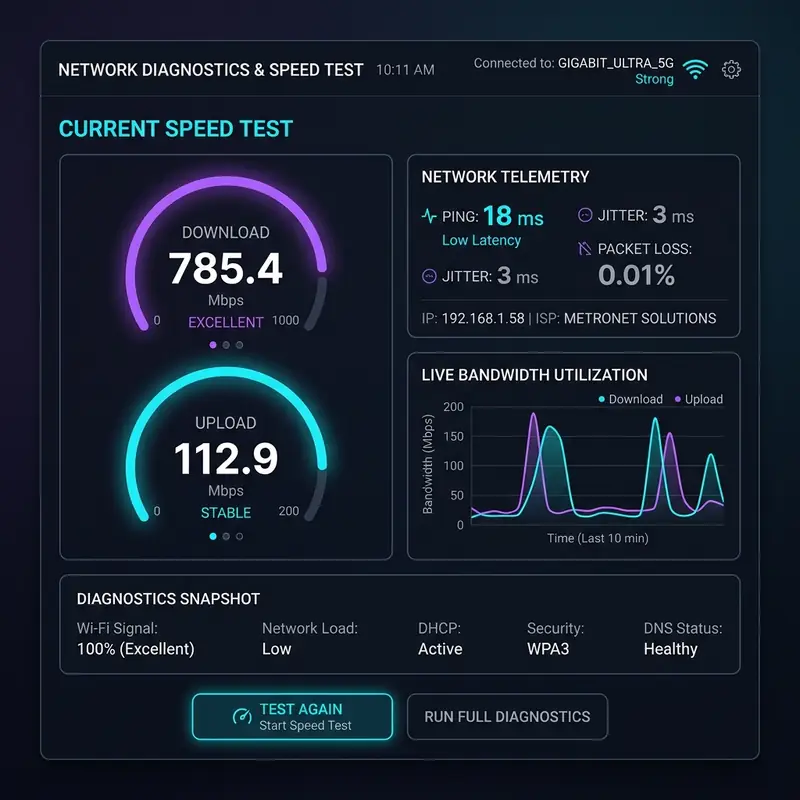
In addition to server tuning, implementing effective caching policies can significantly enhance performance. Utilizing caching solutions like OPcache, Redis, and Memcached can drastically reduce the time it takes to serve content.
OPcache, for instance, optimizes PHP bytecode, reducing the need for script parsing. Redis, a powerful in-memory data structure store, is particularly useful for caching session data or frequently accessed objects, while Memcached can be employed to cache database query results.
By storing data in memory, these caching mechanisms minimize database hits, thereby improving response times and reducing server load.
Understanding core networking metrics is an integral aspect of performance tuning. Time to First Byte (TTFB) latency is an essential metric that measures the time it takes for the server to send the first byte of data in response to a client request. A high TTFB can indicate issues such as server overload or inefficient routing.
Monitoring this metric gives you the insights needed to fine-tune your application and server configuration. Additionally, assessing server load, which refers to the amount of computational work that a server handles at any given time, can help you identify performance bottlenecks. Balancing server load is vital, particularly during traffic spikes, to ensure that your Node.js application remains responsive.
Bandwidth allocation is another critical component that affects performance. Understanding how much bandwidth your hosting provider allocates can help prevent throttling issues and ensure that your application can handle the expected user traffic.
By analyzing traffic patterns and adjusting bandwidth allocation accordingly, you can ensure that your Node.js application serves content quickly, even during peak usage times. Tools for monitoring bandwidth usage can also help you identify any anomalies, allowing for proactive adjustments before they impact user experience.
Ultimately, a comprehensive approach to server performance tuning involves a combination of these strategies. By systematically evaluating and optimizing server settings, implementing robust caching mechanisms, monitoring core networking metrics, and ensuring adequate bandwidth allocation, you can create a powerful hosting environment for your Node.js applications that delivers high performance and reliability.
Server-Side Cybersecurity Protocols: Ensuring Robust Protection for Node.js Applications

Beyond SSL, setting up robust IP tables is essential for controlling incoming and outgoing traffic. IP tables act as a powerful firewall that can filter traffic based on rules defined by the administrator.
By creating specific rules that allow or deny traffic from certain IP addresses or ranges, you can effectively reduce the risk of unauthorized access to your Node.js application. Regularly reviewing and updating these rules is important, especially as new threats emerge and your application evolves.
DDoS (Distributed Denial of Service) attacks pose a significant threat to web applications. Implementing a DDoS firewall can help mitigate such attacks by monitoring traffic patterns and identifying malicious activity.
A DDoS firewall can absorb and filter out harmful traffic, ensuring that legitimate users can still access your application even during an attack. It is essential to choose a hosting provider that offers integrated DDoS protection or allows you to configure your firewall settings to enhance your application's resilience against these threats.
Another important aspect of server-side security is managing directory permissions. Inappropriate permissions can expose sensitive files and directories to unauthorized access, leading to data breaches. It is critical to enforce the principle of least privilege, ensuring that only necessary permissions are granted to files and directories. Regular audits of file permissions can help identify and rectify any security loopholes that may exist, thus fortifying your Node.js application against potential exploits.
In conclusion, implementing a comprehensive cybersecurity strategy for your Node.js hosting environment involves multiple layers of protection. From proper SSL configuration and IP tables management to DDoS protection and strict directory permissions, each element plays a vital role in safeguarding your application. By prioritizing these security protocols, you create a more secure environment that not only protects sensitive data but also enhances user trust and compliance with best practices.
Understanding Hosting Limitations: Comparing Shared Servers with Dedicated and Cloud Solutions
When selecting a hosting provider for your Node.js application, understanding the limitations of various server types is paramount. Shared hosting, while often the most economical option, comes with inherent constraints. In a shared environment, multiple websites are hosted on a single server, leading to shared resources such as CPU, RAM, and bandwidth. This sharing can lead to performance degradation, especially during peak traffic times, as one heavily trafficked site can affect the performance of others on the same server. For Node.js applications, which may require more resources due to their event-driven architecture, these limitations can manifest as increased latency and slower response times.In contrast, dedicated servers provide an entire physical machine for your application, allowing for complete control over server resources. This type of hosting eliminates the issues of resource contention seen in shared hosting environments.
Dedicated servers are particularly beneficial for resource-intensive Node.js applications that require consistent performance and reliability. However, the cost of dedicated hosting can be significantly higher, making it less appealing for startups or smaller projects.
Additionally, managing a dedicated server requires a higher level of technical expertise, as administrators are responsible for maintaining the server's security, performance, and software updates.
Cloud hosting solutions offer a blend of the advantages of both shared and dedicated hosting. With cloud hosting, resources are allocated dynamically, allowing for scalability based on demand.
This is particularly advantageous for Node.js applications that may experience fluctuating traffic patterns. A cloud environment can automatically allocate additional resources during high traffic periods and scale back during quieter times, ensuring optimal performance without overspending.
However, it is important to understand the pricing structure of cloud services, which can sometimes lead to unexpected costs if not monitored closely.
Another critical aspect to consider is DNS propagation errors that can arise during the setup or migration of your application. DNS propagation refers to the time it takes for changes to your DNS records to be updated across the internet.
This process can take anywhere from a few minutes to several hours, and during this time, users may experience issues accessing your application. Understanding how DNS works and planning your migrations or changes accordingly can help mitigate the risk of downtime and ensure a smoother transition.
Lastly, database optimization traps can often lead to performance issues if not properly addressed. Node.js applications frequently rely on databases for data storage and retrieval, and inefficient queries or poorly indexed tables can severely impact performance. Regularly monitoring database performance, optimizing queries, and ensuring proper indexing can help prevent these traps.
Additionally, it’s important to consider the Service Level Agreements (SLAs) offered by your hosting provider. An SLA outlines the expected uptime, support response times, and other critical service parameters. Understanding these elements can help you select a hosting provider that aligns with your application's needs and ensures reliable service delivery.
In summary, evaluating the limitations of shared, dedicated, and cloud hosting environments is vital for making an informed decision about your Node.js application hosting. Each option has its strengths and weaknesses, and by understanding these, you can choose the solution that best meets your performance, scalability, and budgetary requirements.






