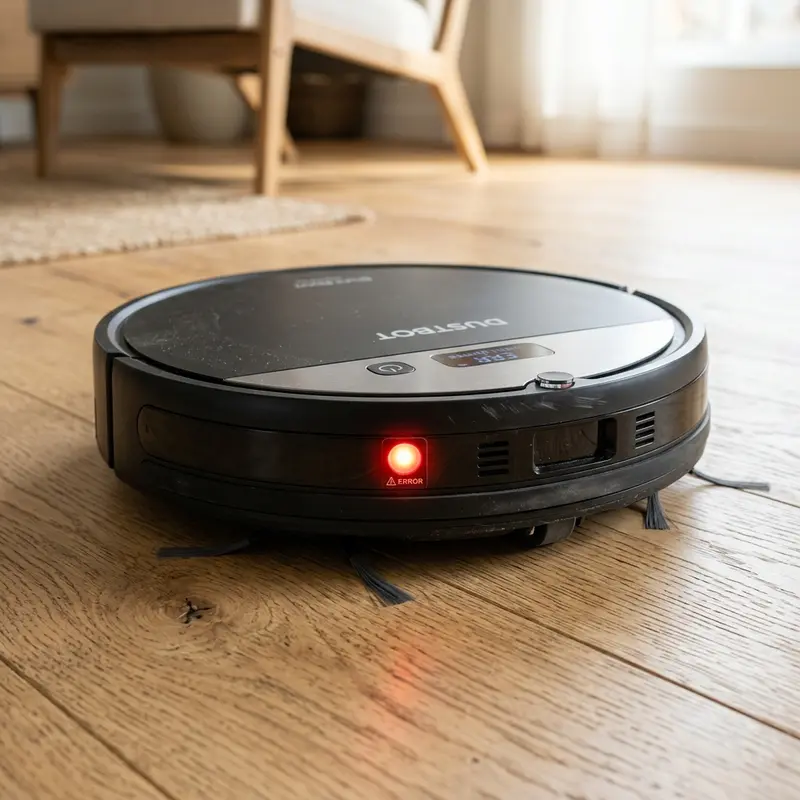
How Do Robot Vacuum Cliff and Collision Sensors Work?
If you are curious about the inner technology of these smart appliances, the robot vacuum presence and detection sensors work by emitting and receiving infrared light beams to calculate distance and avoid impacts. Mounted on the front bumper and underneath the chassis, these sensors compute light reflections in real-time. If the light signal fails to bounce back to the receiver diode, the vacuum senses a step and backs away instantly.
1. Physics Behind Cliff Sensors
A cliff sensor contains two main optical elements: an infrared light-emitting diode (IR LED) and a receiving phototransistor. The emitter shoots an invisible beam of light downward. If a floor surface is present, the light bounces back and hits the receiver, closing the logic loop on the motherboard.
When the robot reaches stairs or a high step, the distance to the floor increases. Since the speed of light is constant, the light beam either misses the receiver or takes too long to bounce back. The processor interprets this as a 'cliff detected', instantly cutting power to the wheel motors and reversing travel. To learn more about preventing stair accidents, check our guide on how to keep robot vacuum from falling stairs.
2. Front Proximity Sensors and Bumper Micro-Switches
To navigate through rooms without slamming into furniture, robot vacuums utilize a redundant sensor array:
- Infrared Proximity Sensors: Positioned behind the dark plastic visor of the front bumper, these sensors send out horizontal beams of light to detect walls and slow down before contact.
- Physical Micro-Switches: If the object is thin (like a chair leg) or dark (absorbing the IR light), the robot will bump into it gently. The impact pushes the bumper back, pressing a mechanical switch that triggers a steering detour.
If your bumper gets stuck, consult our review to see if the Mondial Pratic Clean vacuum is worth the money to understand basic bumper assemblies.
3. Robot Vacuum Sensor Technologies Comparison Table
The table below summarizes the different types of sensors found in modern robot vacuum cleaners:
| Sensor Type | Underlying Technology | Physical Location | Main Objective |
|---|---|---|---|
| Cliff Sensor | Infrared Photodiode | Underside Chassis Edge | Prevent falling down stairs or high ledges. |
| Proximity Sensor | Infrared / Ultrasonic | Front Bumper Frame | Slow down vacuum speed before impact. |
| LiDAR Tower | Rotating Laser (LDS) | Top Mounted Dome | Map room layouts for intelligent routing. |
| Bumper Switch | Mechanical Contact | Behind Front Bumper | Detect direct physical impact with obstacles. |
4. Active Mapping: LiDAR and Câmera-Based vSLAM
In advanced models, navigation stops being reactive and becomes active through mapping sensors. The most common mapping technology is LiDAR (Light Detection and Ranging). A laser turret on top of the robot spins at 360 degrees, emitting low-power laser pulses. By calculating the time it takes for the laser to bounce off walls, the robot creates a layout map.
Another method is vSLAM (Visual Simultaneous Localization and Mapping), which utilizes an upward-facing camera to track physical visual marks on ceilings and walls (like lights and frames) to establish its coordinates.

5. Why Do Robot Vacuums Struggle with Dark Carpets?
A common sensor error occurs when the vacuum drives onto dark or black carpets. Because the color black absorbs infrared light instead of reflecting it, the cliff sensors receive no signal return. The robot's processor assumes it has reached a cliff ledge, prompting it to stop, back up, or shut down with an error code. Keeping the sensor windows clean helps reduce false drop-off alerts.
Infrared Signal Demodulation and Ambient Sunlight Rejection Filters
Robot vacuum infrared sensors operate on modulated light (typically pulsing at 38 kHz to 40 kHz) to prevent interference from natural sunlight. Sunlight contains broad-spectrum infrared radiation that can saturate optical sensors, causing the vacuum to stall or hit furniture. The receiver photodiode uses a bandpass filter that rejects constant light sources and only registers the modulated frequency.
However, intense sunlight reflecting off shiny tile floors can still overwhelm the optical receiver, triggering false obstacle reports. Drawing curtains during bright daylight hours stabilizes the infrared tracking logic, keeping the vacuum on course.
Laser Time-of-Flight (ToF) Spatial Mapping Trigonometry
Top-mounted LiDAR sensors use Time-of-Flight (ToF) calculations to map floor layouts. The laser turret shoots a focused light pulse and counts the picoseconds it takes for the reflection to hit the receiver diode. Using the constant speed of light, the navigation software calculates distance metrics across a 360-degree sweep.
The processor uses trigonometry to map these distance points on a grid, establishing boundaries, walls, and doorways. This real-time spatial mapping allows the vacuum to navigate in clean, logical paths and save maps in memory.
Optical Absorbance Calculations for Carbon Black Pigmented Textiles
The primary limitation of infrared sensors is dark floor surfaces. Black carbon pigments absorb light wavelengths in the 940nm range. Because no light reflects back to the cliff receiver, the vacuum assumes a drop-off is present, reversing or stopping with sensor alerts.
If you do not have stairs in your home, you can cover the underside cliff sensors with white paper templates to prevent false drop-off stops on black rugs. Always remove these templates if the vacuum is moved to a second floor with stairs.
Carrier Signal Demodulation at 38kHz in Infrared Transceivers
The infrared sensors on robot vacuums pulse at 38 kHz to prevent interference from household lights and sunshine. The receiver photodiode features a demodulator circuit that filters out ambient light signals, processing only the modulated frequency pulse.
This design prevents false obstacle alerts on sunny floors. If the demodulator circuit fails due to motherboard heat, the vacuum will collide with walls. Keep the front bumper clean to ensure optimal signal reception.
Processor Interrupt Times and Wheel Motor Safety Cut-offs
The vacuum CPU runs a high-priority interrupt loop that checks cliff sensor readings every 10 milliseconds. If a sensor reports a drop-off, the CPU halts navigation threads and cuts voltage to the H-bridge drivers powering the wheels.
This rapid cutoff stops the vacuum within 50 milliseconds, keeping it from driving off stair ledges. Keeping the firmware updated ensures this interrupt loop runs without lag, protecting your vacuum from falls.
Optical Ranging Errors on Mirrored and Highly Glossy Surfaces
Laser LiDAR systems struggle with mirrored or highly reflective surfaces. The laser beam bounces away instead of reflecting back to the sensor, creating mapping errors. The robot may see the reflection as an open room and crash into the mirror.
Place physical boundaries or low anti-reflective tape on mirrors and glass doors at the LiDAR height. This ensures the laser bounces back correctly, allowing the vacuum to map the room safely.
Magnetic Hall Effect Sensing for virtual boundary tapes
Robot vacuums use Hall effect sensors to detect magnetic fields from boundary strips laid on the floor. When the vacuum crosses the strip, the magnetic field changes the sensor's output voltage, instructing the navigation software to steer back.
If the Hall sensor housing accumulates fine metal dust, the magnetic readings can be distorted, causing the vacuum to cross boundaries. Wipe the sensor area monthly to maintain magnetic barrier detection.
Tangle Detection Logic Protocols for Main Roller Brushes
The motherboard monitors the current draw of the main roller brush motor. If wires or rug tassels wrap around the brush, current spikes above 1A due to mechanical load, and the system shuts down the sweeper motor within 2 seconds.
This safety protocol protects the roller motor from burning out and prevents damage to cables, allowing users to safely clear the jam and resume cleaning.
Side Wall-Follow Proximity Sensors and Parallel Steering Navigation Algorithms
Robot vacuums feature a side-facing infrared proximity sensor. This sensor tracks the distance to the wall, allowing the steering software to guide the vacuum along baseboards at a constant distance of 1 cm, sweeping edges efficiently.
Keep the side sensor visor clean to maintain baseboard tracking. Dust build-up can cause the vacuum to drift away from walls or collide with baseboards.
Comparing Mechanical Micro-Switches with Optical Obstacle Triangulation
Entry-level vacuums use mechanical switches behind the front bumper to register physical collisions. Premium models use optical triangulation sensors or LiDAR to detect furniture in advance, slowing down the robot before any physical impact.
While optical sensors prevent furniture scratches, mechanical bumpers are reliable fail-safes. Combining both technologies delivers optimal navigation security.
Replacing Damaged Cliff Sensor Photo-diodes Step-by-Step
If an optical cliff sensor fails, the vacuum's safety logic prevents it from moving forward. To replace the damaged module, unscrew the bottom chassis cover to access the internal wiring harness.
Disconnect the sensor plug, lift out the damaged block, and fit in a new module, securing the wire harness to restore step detection and safety logic.
Anti-reflective Tape Solutions for false cliff alerts on dark rugs
If your vacuum refuses to clean dark rugs, you can apply white reflective tape over the sensor covers. This tricks the sensor into reading a safe floor height, allowing the vacuum to clean dark carpets.
Be aware that covering the sensor windows completely disables all height detection capabilities.. This bypass should only be used in single-level apartments without any staircases..
Ultrasonic Acoustic Sensor Applications on Hybrid Vacuums
Acoustic transceivers detect floor textures by emitting high-frequency waves. Rugs and carpets absorb sound, producing weak echoes, which tells the vacuum to lift the mop plate and boost suction.
Wipe the sensor faces regularly to prevent dust scattering. Keeping the ultrasonic sensors clear of dander ensures precise carpet identification and dry rugs.
Understanding Optical Cross-Talk in Infrared Sensor Arrays
Infrared sensors placed too close together can suffer from optical cross-talk, where the receiver registers reflections from adjacent emitters, triggering false obstacle stops.
To prevent this, vacuums modulate emitter signals at unique pulse codes. Keeping the sensor windows clean ensures the demodulator processes only the correct return signal.
Testing Optical Emitter Wavelength Output
Infrared emitters emit light in the 940nm spectrum. You can check if the emitters are functioning by viewing them through a smartphone camera screen. A working emitter displays a faint purple light on the screen, verifying that the sensor diode has electrical power.
Cleaning and Maintaining Optical Bumper Visors
The front bumper visor protects the proximity infrared sensors. Over time, scratches and dust films on this acrylic shield refract the IR light, triggering false obstacle stops.
Clean the bumper visor weekly using a dry microfiber cloth. Avoid using abrasive cloths or harsh cleaners that can scratch the acrylic shield and disrupt navigation patterns.
Configuring Sensor Sensitivity Settings in Advanced Apps
Some robot vacuums allow users to adjust sensor sensitivity thresholds via the developer menu to handle glossy tiles or dark rugs, reducing false drop-off stops.
Ensure your app is updated to access these diagnostic parameters, allowing you to configure obstacle and cliff thresholds based on your home's flooring.
Re-calibrating Sensors post Software Update
If your vacuum displays sensor blocked alerts after firmware updates, a sensor calibration loop is needed. Navigate to the device settings page in the mobile application to run a diagnostic calibration, resetting the factory infrared limits.
Frequently Asked Questions (FAQ)
What should I do if my robot vacuum throws a cliff sensor error?
Wipe the plastic sensor windows on the bottom of the vacuum with a soft, dry cloth. Dust build-up blocks the infrared beam, creating false drop-off alerts.
How does the robot vacuum locate its charging dock?
The charging base emits an invisible infrared signal beam in a V-shape. The receiver sensor on the front of the robot tracks this signal to guide the vacuum onto the charging plates.
Do laser LiDAR sensors work in complete darkness?
Yes. Since LiDAR is an active laser emitter, it does not depend on ambient light to map rooms and navigate, allowing it to clean perfectly in dark rooms.
Should I use wet wipes on Xiaomi cliff sensor lenses?
No. Liquid cleaners can seep past the outer lens seals and short-circuit the internal photodiode board. Use dry microfiber cloths only.
Conclusion
Robot vacuum presence sensors are crucial safety components. Regular maintenance and cleaning of the infrared sensor covers prevent navigation errors and keep your vacuum from falling down stairs.




