Do Wi-Fi Security Cameras Use Lots of Data? The Ultimate Bandwidth Guide

Do Wi-Fi Security Cameras Use Lots of Data? The Ultimate Bandwidth Guide
The rapid expansion of smart home IoT ecosystems has brought a vital question to the forefront of security system design: do Wi-Fi security cameras use lots of data? If you are planning to monitor your property using smart surveillance hardware, understanding how network packets behave is essential to avoid lagging your other devices. In short, the answer depends entirely on your video compression codecs, resolution limits, frame rate (FPS) values, and whether you store your video feeds on local hardware or stream them to the cloud. By analyzing these technical factors, you can build a stable home network that keeps your security active without slowing down your family's daily online activities.

Understanding the Difference: Local Network (LAN) vs. External Internet (WAN)
To accurately diagnose how much data a security camera consumes, you must distinguish between local area network (LAN) traffic and wide area network (WAN) internet traffic. Smart IP cameras communicate using radio frequency bands to transmit digitized video streams. If your camera is paired with a local NVR (Network Video Recorder), a computer server, or a NAS (Network Attached Storage) system located physically inside the same house, the data transfer is strictly local (LAN). It consumes internal Wi-Fi bandwidth, but it does not use up your internet service provider's (ISP) monthly data allowance, nor does it affect your external internet upload or download speeds.
External internet (WAN) data consumption only occurs under specific routing conditions. The first is when you open a mobile application from outside your home (using cellular networks like 4G or 5G) to stream live video. The second, and most common, is when you subscribe to cloud recording services provided by brands like Tapo, Hikvision, Xiaomi, or Ring. In a cloud storage setup, the camera must continuously upload video data packets across your router's WAN interface, directly using your internet upload bandwidth. Knowing how to plan your storage is critical, and you may want to read about cameras that record to SD card without internet to see how an offline storage strategy can eliminate WAN data usage entirely.
How Video Resolution Affects Data Usage (Full HD vs. 2K vs. 4K)
Video resolution defines the height and width of the pixel grid that forms each frame of your video feed. Higher pixel counts mean more visual information must be digitized, compressed, and transmitted over the air by the camera's wireless antenna.
- HD Resolution (720p - 1280x720): Contains approximately 921,600 pixels per frame. This resolution has very low data needs, but it can lack the fine detail required to identify faces or license plates at a distance.
- Full HD Resolution (1080p - 1920x1080): Contains about 2,073,600 pixels per frame. This is the current industry standard, offering a good balance between data use and image quality.
- 2K Resolution (1440p - 2560x1440): Contains roughly 3,686,400 pixels per frame. It offers higher clarity but requires stronger processing chips and uses more network bandwidth.
- 4K Resolution (2160p - 3840x2160): Contains over 8,294,400 pixels per frame. 4K feeds are extremely data-intensive. Multiple 4K cameras streaming at once can easily saturate typical home internet plans.
For home security optimization, you should also learn how to prevent Wi-Fi camera jamming, as malicious signals can disrupt these high-density streams and knock your entire security system offline.
The Role of Compression Codecs: H.264, H.265 (HEVC), and Smart Codecs
Video compression algorithms, known as codecs, determine the efficiency of your security camera's data transmissions. Older or cheaper cameras often rely on the H.264 (AVC) standard, which requires a large, continuous stream of data to maintain image quality. Modern devices utilize the newer H.265 (HEVC - High Efficiency Video Coding) standard. H.265 reduces file sizes and bandwidth needs by up to 50% compared to H.264, without losing any resolution or image clarity.
H.265 accomplishes this savings using advanced spatial (intra-frame) and temporal (inter-frame) compression algorithms. Instead of sending every pixel of every frame sequentially, the camera's encoder sends key reference images called I-Frames (Intra-coded frames). Between these I-Frames, the encoder only transmits the differences and motion vectors in P-Frames (Predicted frames). If the camera is viewing a static scene (like a dark, quiet garage at night), the H.265 codec drops the transmission rate to just a few dozen kilobits per second. If there is significant movement (like tree branches moving in the wind), the bitrate increases dynamically to capture the details clearly.
Major manufacturers also develop proprietary "Smart Codecs" (such as Hikvision's H.265+ or Intelbras' Smart H.265). These algorithms identify static zones in the image (like walls or driveways) and apply heavy compression to those areas, saving network bandwidth for moving objects like people or vehicles.
Frame Rate (FPS) and Bitrate Control: CBR vs. VBR
Frame rate, measured in FPS (Frames Per Second), defines the smoothness of your video feed. Higher frame rates produce smoother movement. A feed running at 30 FPS is highly fluid but uses far more bandwidth than one configured to 15 FPS. For most residential and commercial security needs, 15 FPS to 20 FPS is more than enough to capture clear action without overloading your network.
Bitrate (the amount of data processed per second) is managed in two ways within IP camera configuration panels:
Constant Bitrate (CBR)
In CBR mode, the camera forces a fixed data transmission rate set by the user (such as 2048 Kbps), regardless of what is happening in the scene. Even if the camera is recording a static black wall, it injects empty filler data into the packets to maintain that rate. While CBR makes monthly storage usage predictable, it wastes valuable Wi-Fi and upload bandwidth.
Variable Bitrate (VBR)
In VBR mode, the data transmission rate adjusts dynamically based on the complexity of the scene. The user sets a maximum limit (like 3000 Kbps) and a target quality level. The camera's image processor decreases data throughput when the scene is quiet and increases it when motion is detected. VBR is the recommended setting for home security cameras connected to residential Wi-Fi networks.
Bandwidth Consumption Comparison Table
Here is a detailed breakdown of average bandwidth usage and monthly data volume per camera, based on resolution, frame rate, and compression codecs:
| Resolution | Codec | FPS | Average Bitrate (VBR) | Data Per Hour (MB) | Monthly Usage (GB) |
|---|---|---|---|---|---|
| HD (720p) | H.264 | 15 | 1024 Kbps | 450 MB | 324 GB |
| Full HD (1080p) | H.264 | 15 | 2048 Kbps | 900 MB | 648 GB |
| Full HD (1080p) | H.265 | 15 | 1024 Kbps | 450 MB | 324 GB |
| 2K (1440p) | H.265 | 20 | 2048 Kbps | 900 MB | 648 GB |
| 4K (2160p) | H.265 | 15 | 4096 Kbps | 1800 MB | 1296 GB |
Note: The monthly data estimates above assume continuous, 24/7 cloud recording and upload. If your security camera saves footage locally and only uploads short event-triggered clips, your actual internet usage will be less than 5% of these values.
How Recording Modes Impact Bandwidth
The recording configurations you choose for your security system determine how much data travels over your home internet connection.
Continuous Cloud Recording
This is the most bandwidth-heavy setup. The camera continuously encodes and uploads video streams to a remote server. As shown in the comparison table, a single Full HD (1080p) camera using standard H.264 compression can consume up to 648 GB of upload data per month. If your internet plan has a data cap (common with satellite or cellular internet services), a few continuous cloud cameras can easily exhaust your data limit. In addition, continuous uploading can saturate your router's upload queue, causing high latency (ping spikes) for other devices on the network.
Event-Triggered Recording
This is the most efficient configuration for saving bandwidth. The camera records video locally to a high-endurance MicroSD card and only uploads files to the cloud when its motion sensors (PIR or software-based) detect activity. Instead of uploading video constantly, the camera stays in a low-power standby mode, sending only a push notification with a small thumbnail image or a 10-to-15-second video clip. This reduces monthly data usage to a few gigabytes.
Remote Live Streaming
Viewing live video feeds from a mobile application also consumes external WAN data. When you watch your cameras remotely, the app connects to the manufacturer's peer-to-peer (P2P) servers, requesting the stream. Your home connection's upload usage will match the camera's configured bitrate during the time the feed is open. Closing the application stops the data transfer immediately.
How to Reduce Your Cameras' Bandwidth Usage
If you notice network slowdowns or want to ensure your security system does not impact your Wi-Fi performance, implement these optimization strategies:
- Switch to H.265 (HEVC): Check your camera's video settings and select H.265 if available. This can cut your data usage in half without affecting image quality.
- Use Variable Bitrate (VBR): Avoid Constant Bitrate (CBR) settings. Variable Bitrate adjusts the data rate based on scene activity, saving significant bandwidth during quiet times, such as overnight.
- Lower Frame Rate to 15 FPS: Reducing the frame rate from 30 FPS to 15 FPS cuts down data volume while keeping movement clear enough for security purposes.
- Adjust Motion Detection Sensitivity: Set up custom motion zones in your camera app. Exclude high-traffic roads, moving tree branches, and changing clouds to prevent unnecessary event uploads.
- Configure Dual Streaming: Set your mobile app to load the low-resolution "Sub Stream" (SD) by default when viewing multiple cameras, and only load the high-resolution "Main Stream" (HD) when expanding a single camera feed.
Choosing the Right Router and Setting QoS (Quality of Service)
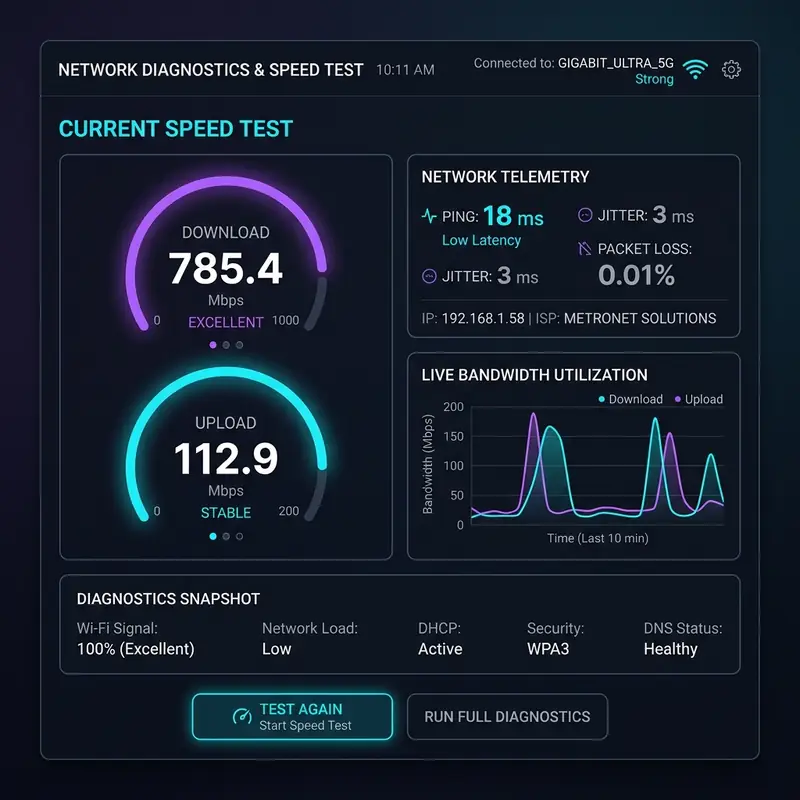
If your security cameras continue to affect your Wi-Fi stability, the issue may be your router's processing power. Basic routers provided by ISPs often feature low-power processors and limited RAM (like 128MB). Managing dozens of simultaneous IP camera connections can overheat these devices and lead to high latency, jitter, and dropped connections.
Upgrading to a Wi-Fi 6 router can resolve these issues. Wi-Fi 6 uses technologies like OFDMA (Orthogonal Frequency-Division Multiple Access) and MU-MIMO to communicate with multiple devices at once over split channels, preventing packet queues and reducing lag.
You can also configure **QoS (Quality of Service)** in your router's administration panel. QoS allows you to prioritize network traffic. You can set work computers, gaming consoles, and streaming devices to high priority, while setting IP cameras to medium or low priority. This ensures that even if your cameras upload large files, your work calls and streaming sessions remain stable.
Frequently Asked Questions (FAQ)
1. Does recording to an SD card use my internet data?
No. Recording to a local MicroSD card is done entirely on the camera's hardware, without sending data over your local Wi-Fi or the internet. Internet data is only consumed when you open the mobile app from outside your home network to watch those recordings.
2. Can I use multiple Wi-Fi cameras on a slow internet connection?
Yes. If your upload speed is under 10 Mbps, configure your cameras to record locally to MicroSD cards, use motion detection alerts only, and stream live feeds in SD (sub-stream) quality. Avoid continuous cloud recording.
3. Will my camera record if the internet connection drops?
Yes. If the camera has power and a compatible MicroSD card is installed, it will continue to record locally even if the internet goes down. However, you will not receive mobile alerts or be able to view the live feed remotely until the internet is restored.
4. Why does my camera use more data at night?
Infrared night vision creates visual noise (gray and white grain) in low light. Dynamic bitrate algorithms (VBR) interpret this grain as motion, which increases the camera's bitrate and data consumption compared to a static daytime image.
Final Thoughts on Network Security
Planning your Wi-Fi security system requires understanding bandwidth consumption and managing your local network resources. By choosing H.265 compression, using Variable Bitrate (VBR), and relying on local MicroSD storage, you can maintain a highly effective security setup without affecting your family's internet access. Configure your router, optimize your settings, and enjoy a safe, connected home.



