Deciding which Amazon Kindle to buy can feel overwhelming given the varied choices. Whether you are looking for a budget-friendly companion, a waterproof travel partner, or a digital notebook, Amazon has designed a device for you.
Direct Answer: The Kindle Paperwhite is the overall best Kindle for most readers, offering a balance of screen size, waterproofing, and warm backlighting.
Dica DomineTec: If you are on a budget, look out for the basic Kindle model during shopping events. It features the same high-resolution display as its pricier siblings, making it a stellar entry point.
1. The Kindle Lineup Overview
Amazon's current Kindle family is divided into distinct categories, each targeting a specific type of reader and price point. Understanding these categories is the first step toward making an informed purchase decision.
At the entry level, we have the Basic Kindle, designed for lightweight portability and affordability. Moving up, the Kindle Paperwhite and its premium sibling, the Paperwhite Signature Edition, serve as the mainstream sweet spot. Finally, at the high-end, the Kindle Scribe doubles as an e-reader and a writing tablet with a digital stylus.
Publicidade
Every Kindle model uses E Ink technology, which is fundamentally different from the LCD or OLED screens on smartphones and tablets. E-ink screens do not emit light directly toward your eyes; instead, they reflect light from the environment, drastically reducing eye strain and allowing for glare-free reading in broad daylight. Let us examine each model in detail. Furthermore, the battery life of E Ink displays is measured in weeks rather than hours, as they only draw power when changing the image on the screen, not while displaying static text.
2. Kindle (Basic): The Portability Champion
The standard, entry-level Kindle is the smallest and lightest e-reader in Amazon's roster. Weighing in at just 158 grams and featuring a compact 6-inch display, it can easily fit into a jacket pocket, small purse, or even the back pocket of your jeans.
Despite its low price, Amazon did not compromise on text quality. The basic Kindle features a 300 ppi display, matching the resolution of the expensive models. It also includes 16GB of storage and a USB-C port. However, it lacks a few premium features: it is not waterproof, it does not have the adjustable warm light feature (only standard front light), and the screen is slightly recessed rather than flush with the front bezel. For casual readers who value portability and budget, this is an outstanding choice.
Publicidade
The pocketable size of this basic model makes it highly popular among commuters and travelers who read during train rides or short flights. The chassis is mostly constructed from post-consumer recycled plastics, giving it a lightweight yet slightly tactile plastic feel. While it does not look as luxury-oriented as the glass-covered displays, its matte textured bezel is highly resistant to fingerprints and drop impact.
3. Kindle Paperwhite: The Gold Standard for Most Readers
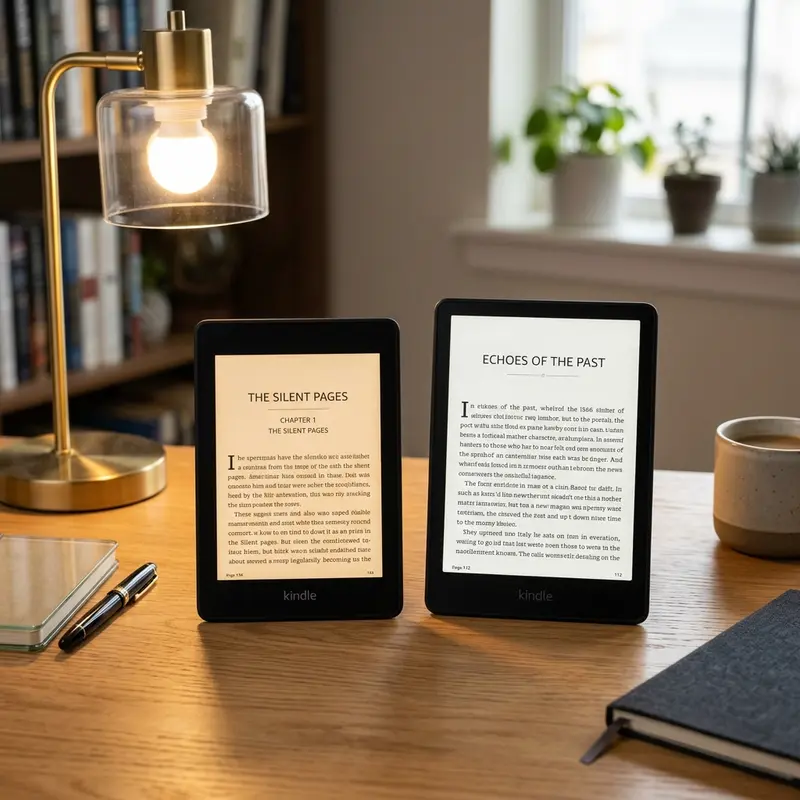
The Kindle Paperwhite is widely considered the best overall e-reader on the market. It features a larger 6.8-inch display, which allows more text to fit on the screen at once, reducing page turns. The design is flush-front, meaning the screen glass extends to the edges without a raised frame, giving it a premium feel.
Key features that make the Paperwhite the ideal choice include:
Adjustable Warm Light: Lets you change the screen tone from cool white to warm amber, reducing blue light exposure during nighttime reading.
IPX8 Waterproofing: Protected against accidental immersion in up to two meters of fresh water for up to 60 minutes. You can read by the pool, at the beach, or in the bath without fear.
Excellent Battery Life: Offers up to 10 weeks of reading on a single charge.
Publicidade
The Paperwhite represents the absolute sweet spot of price and features, making it the default recommendation for almost anyone looking to buy an e-reader. The Carta 1200 e-ink panel used in this generation provides 20% faster page turns and a noticeably deeper contrast ratio than older models, ensuring that black levels look incredibly rich and close to printed ink.
4. Kindle Paperwhite Signature Edition: The Premium Mainstream
For those who want the Paperwhite design but desire a few luxurious upgrades, the Signature Edition is the answer. It keeps the same 6.8-inch screen and waterproof build of the standard Paperwhite but introduces three major improvements:
32GB of Storage: Double the storage of the standard model, perfect for large audiobooks, graphic novels, and PDFs.
Qi Wireless Charging: Works with standard charging pads so you can top up without plugging in a cable.
Auto-Adjusting Light: A built-in sensor adjusts the display's brightness based on ambient light conditions.
Publicidade
It also comes completely ad-free by default. If you love premium gadgets and have the extra budget, the Signature Edition offers unmatched convenience. The inclusion of the automatic brightness control is a game-changer for those who move between outdoor daylight and indoor settings frequently, as it scales the front light down to zero in bright sunlight to maximize contrast, and turns it up to comfortable levels when reading in pitch darkness.
5. Kindle Scribe: The Large Screen and Digital Notebook
The Kindle Scribe is the largest and most unique e-reader Amazon has ever made. Sporting a massive 10.2-inch screen, it is designed not only for reading but also for writing. It comes with a battery-free digital stylus, allowing you to annotate PDFs, write directly on books, create digital notebooks, bullet journals, and sketching lists.
The large screen is perfect for reading academic papers, spreadsheets, and complex PDFs without zooming. However, its size makes it less portable and heavier to hold with one hand for long periods. It is also significantly more expensive than the other models, positioning it as a productivity tool rather than just a casual e-reader.
Publicidade
The handwriting integration on the Scribe is surprisingly smooth. Thanks to the screen's micro-etched surface, writing with the stylus feels incredibly natural, mimicking the tactile drag of a pencil on real paper. You can select between different pen widths, highlighters, eraser tools, and undo/redo functions. Furthermore, you can export your handwritten notes as typed text via email, or sync them directly with your computer through the Amazon cloud.
6. Kindle Kids Editions: A Smart Choice for Young Readers
Amazon also offers "Kids" versions of both the Basic Kindle and the Kindle Paperwhite. While the hardware is exactly identical to the standard retail models, the Kids bundle includes several unique benefits that make it an attractive package even for some adults:
Included Cover: Every Kids model comes packaged with a sturdy, colorful folio cover featuring kid-friendly designs or plain colors.
2-Year Worry-Free Guarantee: If the device gets damaged or the screen cracks within two years of purchase, Amazon will replace it for free, no questions asked.
1 Year of Amazon Kids+: A subscription service offering unlimited access to thousands of popular children's books, series, and educational tools.
No Ads: Unlike the standard models which display lock-screen ads, the Kids editions are completely ad-free out of the box.
Publicidade
7. Decision-Making Matrix: Which Kindle Fits Your Lifestyle?
Choosing the ideal model depends heavily on how, where, and when you plan to read. Let us break down the recommended options based on typical reading lifestyles:
The Beach & Travel Enthusiast: Choose the Kindle Paperwhite. The waterproofing is crucial for survival around pools, sand, and ocean spray. The 6.8-inch screen is spacious enough for travel guides and long novels, and the 10-week battery life means you can leave the charging cable at home.
The Nighttime Reader: Choose the Kindle Paperwhite Signature Edition. The combination of the auto-adjusting light sensor and the warm light schedule means the device adapts to dim bedside lamps and total darkness without requiring manual settings.
The Commuter on a Budget: Choose the Basic Kindle. Its ultra-light, 6-inch form factor fits easily in pockets and can be held comfortably with one hand on crowded buses or subways.
The Academic, Professional, or Comic Lover: Choose the Kindle Scribe. The large 10.2-inch canvas allows full-page PDF rendering and diagram viewing, and the note-taking capability is vital for marking up lecture slides or drafting business ideas.
Publicidade
8. Summary Comparison Table
Here is a detailed comparison of all current Kindle models to help you decide:
1. Does the Kindle basic display look blurry compared to the Paperwhite?
Publicidade
No, the Kindle basic has a pixel density of 300 ppi, which is exactly the same as the Paperwhite and Scribe. The text will look just as sharp and crisp on the basic model, although the screen is physically smaller.
2. Can I read PDFs comfortably on the Kindle Scribe?
Yes, the Kindle Scribe is by far the best Kindle for PDFs. Its large 10.2-inch screen can display full A4/Letter size documents comfortably without needing to zoom or pan. You can also write notes directly on the PDF with the stylus.
3. Which Kindle has the longest battery life?
The Kindle Paperwhite models offer the longest battery life, lasting up to 10 weeks of typical use. The basic Kindle lasts up to 6 weeks, while the Scribe lasts up to 12 weeks for reading but less if you write heavily with the stylus.
4. Are all Kindle models ad-supported?
Amazon offers the basic Kindle and standard Kindle Paperwhite in both "Ad-Supported" and "Without Ads" versions. The version with ads is cheaper, displaying advertisements on the lock screen. The Signature Edition and Scribe are only sold as ad-free models.