
Finding an affordable 3D printer for beginners can be overwhelming. However, several excellent budget-friendly options provide great value and features.
Understanding the Basics of 3D Printing
3D printing is a revolutionary technology that allows users to create three-dimensional objects from digital files. It utilizes additive manufacturing processes, where materials are added layer by layer to form the final product.
Before diving into specific models, understanding the types of 3D printers available and the materials they use is crucial. This knowledge will help in selecting the printer that best fits individual needs.
Types of 3D Printers for Beginners
Several types of 3D printers are suitable for beginners, each with its pros and cons. The most common types include Fused Deposition Modeling (FDM), Stereolithography (SLA), and Selective Laser Sintering (SLS).
FDM printers are the most popular choice among hobbyists due to their affordability and ease of use. They work by melting plastic filament and layering it to create an object.

SLA printers use a laser to cure resin into solid layers, producing highly detailed prints but often at a higher cost. SLS printers utilize powdered materials and a laser to fuse them, but these are typically more expensive and complex.
Top Budget-Friendly 3D Printers for Beginners
When selecting a budget 3D printer, consider factors like print quality, build volume, and ease of assembly. Here are some of the best models recommended for beginners:
| Model | Print Volume | Filament Type | Assembly | Price |
|---|---|---|---|---|
| Creality Ender 3 | 235 x 235 x 250 mm | PLA, ABS, PETG | Partial assembly required | $200 |
| Anycubic i3 Mega | 210 x 210 x 205 mm | PLA, ABS | Fully assembled | $250 |
| Monoprice Select Mini V2 | 120 x 120 x 120 mm | PLA, ABS | Fully assembled | $200 |
| Artillery Sidewinder X1 | 300 x 300 x 400 mm | PLA, ABS, TPU | Partial assembly required | $400 |
| Elegoo Mars 2 Pro (Resin) | 129 x 80 x 160 mm | Resin | Fully assembled | $300 |
Choosing any of the models listed above can provide an excellent entry point into the world of 3D printing. Each printer is designed to be user-friendly, making it easier to start creating right away.
Essential Accessories for 3D Printing
To get the most out of a 3D printer, certain accessories are highly recommended. These can enhance the printing experience and improve print quality.
- Filament: Selecting the right filament is crucial. PLA and ABS are common choices, with PLA being easier to work with.
- Print Surface: Upgrading to a better print surface can improve adhesion and reduce print failures.
- Cleaning Tools: A nozzle cleaning kit can ensure smooth operation and prevent clogs.
- Spare Parts: Having spare nozzles and belts can save time when maintenance is needed.
- Software: Familiarizing with slicing software, like Cura or PrusaSlicer, is essential for preparing models.

DomineTec Tip: Regularly calibrating the 3D printer enhances print quality; refer to how to calibrate 3D printer for detailed steps.
Common Issues and Troubleshooting Tips
New users may encounter various issues while using 3D printers. Troubleshooting these problems can be vital for a successful printing experience.
Common issues include poor adhesion, stringing, and layer misalignment. Each of these can typically be resolved with minor adjustments.
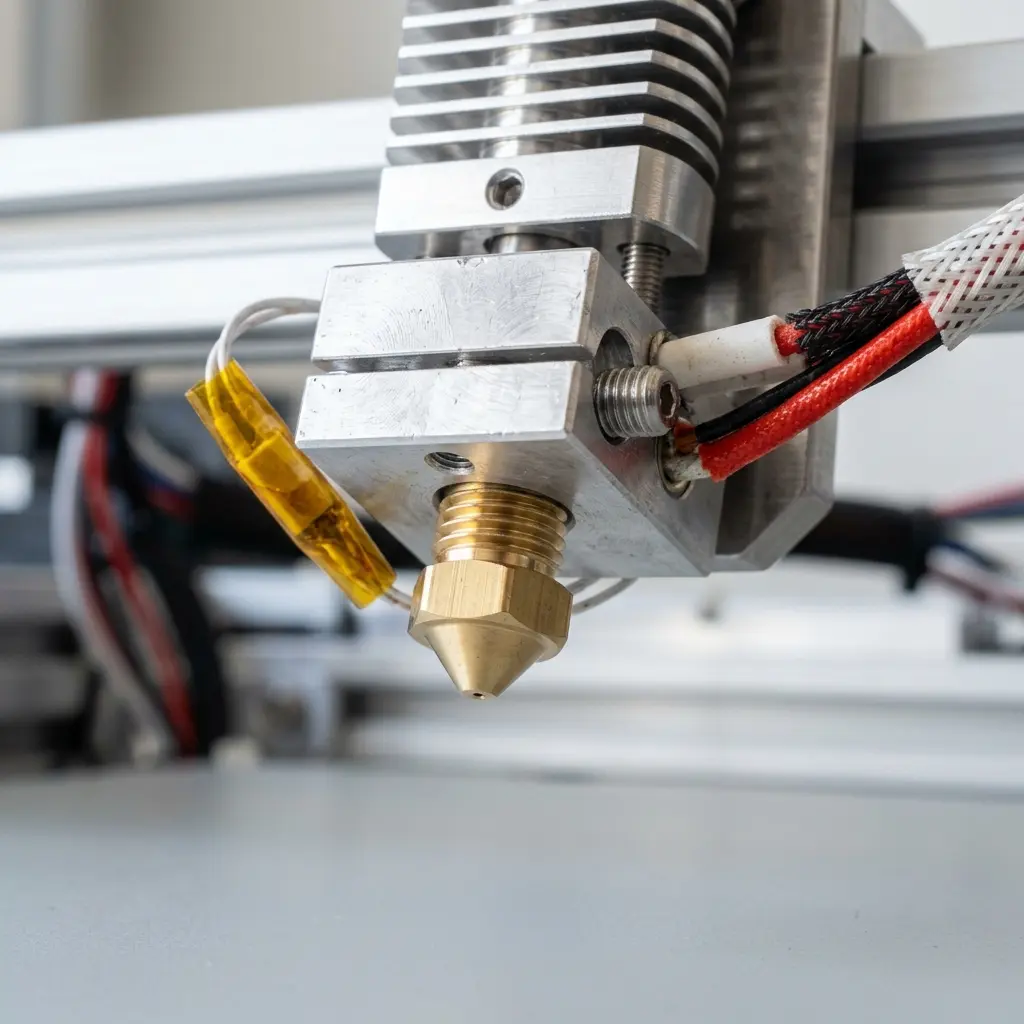
For instance, if prints are not adhering properly to the bed, ensure it is clean and correctly leveled. Adjusting the nozzle height can also help with adhesion.
Stringing can often be reduced by tweaking retraction settings in the slicing software. Ensuring the extrusion temperature is appropriate can also alleviate this issue.
Exploring Different Filament Types
Understanding the different filament types can significantly impact the quality and durability of the printed models. The two most common types are PLA and ABS.
PLA (Polylactic Acid) is known for its ease of use and is biodegradable, making it an excellent choice for beginners. ABS (Acrylonitrile Butadiene Styrene) is more durable but can be more challenging to work with due to warping.
For a detailed comparison, refer to the article on the difference between PLA and ABS, which outlines the advantages and disadvantages of each filament type.

Frequently Asked Questions
What is the best budget 3D printer for beginners?
The Creality Ender 3 is widely regarded as one of the best budget-friendly options for beginners due to its balance of price and performance.
How much does a beginner 3D printer cost?
Beginner 3D printers typically range from $200 to $400, depending on features and specifications. Models like the Anycubic i3 Mega and Monoprice Select Mini V2 fall within this range.
Can I use different filaments with my 3D printer?
Most FDM printers can use various filaments, including PLA, ABS, and PETG. However, it is essential to verify compatibility with each specific printer model.
How can print quality be improved?
Improving print quality involves regular calibration, selecting the right filament, and ensuring the printer is clean. Adjustments to speed and temperature settings can also enhance results.
Is 3D printing safe for beginners?
3D printing is generally safe for beginners, provided proper safety measures are followed. Ventilation is essential when printing with certain materials, especially resins.
Checklist for Getting Started with 3D Printing
Before starting a 3D printing journey, it’s essential to have a plan. Here’s a checklist to ensure everything needed is available:
- Choose a 3D Printer: Select one from the recommended budget-friendly models.
- Acquire Filament: Purchase PLA or ABS filament to start printing.
- Prepare Your Workspace: Set up a well-ventilated and clean area for printing.
- Install Software: Download and install slicing software suitable for the printer.
- Calibrate the Printer: Follow steps to level the print bed and calibrate the nozzle.
- Practice Safety: Use gloves when handling hot components and ensure proper ventilation.
- Start with Simple Models: Download or create simple 3D models to print as practice.
- Join a Community: Consider joining online forums or local maker spaces for support.
Conclusion
Embarking on a 3D printing journey can be exciting and rewarding. With a variety of affordable options available, beginners can easily find a suitable printer that meets their needs.
Understanding the basics of 3D printing, exploring different types of printers, and familiarizing with essential accessories will set individuals up for success. Troubleshooting common issues and engaging with the community for continuous learning is also beneficial.
```htmlAdvanced Configurations for Budget 3D Printers
Many budget-friendly 3D printers offer advanced configurations that can significantly enhance print quality. Adjusting settings like layer height, print speed, and temperature can lead to more professional results without breaking the bank.
Utilizing features such as dual extrusion or heated beds may also be possible in some lower-cost models. Understanding these advanced settings can empower users to achieve higher precision in their prints.
Common Calibration Mistakes to Avoid
Calibration is crucial for successful 3D printing, yet beginners often overlook it. Failing to properly level the print bed can lead to adhesion issues, resulting in failed prints and wasted materials.
Additionally, incorrect nozzle height can cause either excessive squishing of filament or poor layer bonding. Regular calibration checks can prevent these common pitfalls and ensure consistent quality in prints.
Cost Estimations for Beginners
Budgeting for a 3D printer involves more than just the initial purchase price. It is essential to account for ongoing costs such as filament, replacement parts, and potential upgrades.
On average, a beginner can expect to spend between $200 and $500 for a reliable entry-level printer. Including maintenance costs in the budget will provide a more accurate financial picture for new users.
Security Precautions When 3D Printing
Safety should be a priority when operating 3D printers, even budget-friendly models. Ensuring that the printer is placed in a well-ventilated area reduces the risk of exposure to harmful fumes released during printing.
Additionally, monitoring the printer during operation can prevent accidents such as overheating or fire hazards. Implementing safety measures is essential for a secure 3D printing environment.
Alternative Choices for Budget 3D Printing
While traditional FDM printers are popular among beginners, alternative technologies like SLA and DLP printers are also worth considering. These printers can provide high-resolution prints at a competitive price, appealing to those who prioritize detail.
Exploring different types of printers can help users find the best fit for specific projects. Each technology has unique benefits, and understanding them can lead to better-informed purchasing decisions.
Understanding Filament Types and Costs
Filament choice significantly impacts the overall printing experience and cost. PLA is often recommended for beginners due to its ease of use and affordability, while more advanced materials like ABS or PETG require specific printer configurations.
Researching filament types and their respective costs can help in planning projects effectively. Budgeting for different filament materials allows for versatility in printing applications.
Upgrading Budget Printers for Enhanced Performance
Many entry-level 3D printers can be upgraded to improve performance and capabilities. Common upgrades include enhanced cooling systems, better hotends, or larger build plates to accommodate more significant projects.
Investing in upgrades may be more cost-effective than purchasing a new high-end model. This approach allows users to tailor their printers to specific needs while extending the printer's lifespan.
Best Budget-Friendly 3D Printers for Beginners
3D printing has revolutionized the way prototypes and models are created, making it accessible to hobbyists and professionals alike. For beginners, finding an affordable yet reliable 3D printer is crucial. This guide provides an overview of the best budget-friendly 3D printers that cater to those new to the world of 3D printing.
Key Features to Consider
- Build Volume: The size of the print area, which determines the maximum dimensions of printed objects.
- Print Quality: The resolution and detail achievable in prints, often measured in microns.
- Ease of Assembly: Some printers come fully assembled, while others require significant setup.
- Material Compatibility: The types of filament that the printer can use, such as PLA, ABS, or PETG.
- Support and Community: Availability of online resources, forums, and customer support can enhance the user experience.
Top Budget-Friendly 3D Printers
| Model | Price | Build Volume (mm) | Print Quality (microns) | Assembly Level | Material Compatibility |
|---|---|---|---|---|---|
| Creality Ender 3 | $199 | 220 x 220 x 250 | 100 - 400 | Assembly required | PLA, ABS, PETG |
| Anycubic i3 Mega | $219 | 210 x 210 x 205 | 50 - 300 | Mostly assembled | PLA, ABS, TPU |
| Monoprice Select Mini V2 | $199 | 120 x 120 x 120 | 75 - 200 | Fully assembled | PLA, ABS, HIPS |
| Prusa Mini+ | $349 | 180 x 180 x 180 | 50 - 200 | Assembly required | PLA, PETG, ASA |
| Elegoo Mars 2 Pro | $199 | 129 x 80 x 160 | 10 - 100 | Fully assembled | Resin |
Comparison of Features
| Feature | Creality Ender 3 | Anycubic i3 Mega | Monoprice Select Mini V2 | Prusa Mini+ | Elegoo Mars 2 Pro |
|---|---|---|---|---|---|
| Price | $199 | $219 | $199 | $349 | $199 |
| Build Volume | 220 x 220 x 250 | 210 x 210 x 205 | 120 x 120 x 120 | 180 x 180 x 180 | 129 x 80 x 160 |
| Print Quality | 100 - 400 microns | 50 - 300 microns | 75 - 200 microns | 50 - 200 microns | 10 - 100 microns |
| Assembly Level | Assembly required | Mostly assembled | Fully assembled | Assembly required | Fully assembled |
| Material Compatibility | PLA, ABS, PETG | PLA, ABS, TPU | PLA, ABS, HIPS | PLA, PETG, ASA | Resin |
Conclusion
Choosing the right budget-friendly 3D printer for beginners requires careful consideration of various factors such as build volume, print quality, assembly requirements, and material compatibility. The printers listed above represent some of the best options available, allowing newcomers to dive into 3D printing without overspending. Each model brings its unique advantages, making it essential to assess individual needs before making a purchase. With the right printer, anyone can unlock the potential of 3D printing and explore creative projects.
``` ```htmlIntroduction to Budget-Friendly 3D Printers
3D printing technology has become increasingly accessible, offering various options for beginners. Budget-friendly 3D printers provide an excellent entry point into the world of additive manufacturing without breaking the bank.
Key Features to Consider
When selecting a budget-friendly 3D printer, several key features must be considered to ensure a satisfactory experience. These features include build volume, print quality, connectivity options, and ease of use.
Build Volume
The build volume refers to the maximum size of the object that can be printed. Larger build volumes allow for more significant projects but can increase the cost of the printer.
Print Quality
Print quality is determined by the printer's resolution and layer height. A printer with a lower layer height will generally produce finer details, essential for intricate designs.
Connectivity Options
Connectivity options, such as USB, SD card, and Wi-Fi, enhance user convenience. Printers with multiple connectivity options can accommodate various workflows and preferences.
Ease of Use
User-friendly interfaces and straightforward assembly processes contribute to a better experience for beginners. Many budget printers come partially assembled, simplifying the setup process.
Top Budget-Friendly 3D Printers for Beginners
The following section lists some of the best budget-friendly 3D printers suitable for beginners. Each printer is evaluated based on price, features, and user reviews.
| Model | Price | Build Volume (mm) | Layer Height (μm) | Connectivity |
|---|---|---|---|---|
| Creality Ender 3 | $199 | 235 x 235 x 250 | 100 - 400 | USB, SD Card |
| Anycubic i3 Mega | $249 | 210 x 210 x 205 | 50 - 300 | USB, SD Card |
| Monoprice Select Mini V2 | $199 | 120 x 120 x 120 | 100 - 200 | USB, Wi-Fi |
| Elegoo Mars 2 Pro | $249 | 129 x 80 x 160 | 10 - 100 | USB |
| Ender 3 V2 | $279 | 220 x 220 x 250 | 100 - 400 | USB, SD Card |
Comparison of Features
The following table provides a comparison of key features among the top budget-friendly 3D printers. This comparison aids in decision-making for beginners looking for the right printer.
| Feature | Creality Ender 3 | Anycubic i3 Mega | Monoprice Select Mini V2 | Elegoo Mars 2 Pro | Ender 3 V2 |
|---|---|---|---|---|---|
| Build Volume | 235 x 235 x 250 | 210 x 210 x 205 | 120 x 120 x 120 | 129 x 80 x 160 | 220 x 220 x 250 |
| Layer Height | 100 - 400 | 50 - 300 | 100 - 200 | 10 - 100 | 100 - 400 |
| Connectivity | USB, SD Card | USB, SD Card | USB, Wi-Fi | USB | USB, SD Card |
| Assembly | Partial Assembly | Mostly Assembled | Fully Assembled | Fully Assembled | Partial Assembly |
Tips for Beginners
New users should consider a few tips to enhance their 3D printing experience. Familiarizing oneself with slicing software and calibration techniques can lead to better print results.
Choosing the Right Filament
Filament selection is crucial for achieving high-quality prints. Beginners should start with PLA, known for its ease of use and compatibility with most printers.
Calibration and Maintenance
Regular calibration and maintenance of the printer contribute to consistent print quality. Simple tasks such as leveling the print bed and cleaning the nozzle can significantly impact results.
Conclusion
Budget-friendly 3D printers offer an excellent opportunity for beginners to explore the world of 3D printing. With careful consideration of features and user needs, selecting the right printer can lead to a rewarding experience.
```



