WAP Robot W100 Vacuum Cleaner Review: Is It Worth It?
If you are looking to automate the daily cleaning of your floors without spending too much and want to know if this popular, entry-level model is the right fit, here is the technical analysis: the WAP Robot W100 is worth buying if you live in small spaces under 40 m² (430 sq. ft.) with hard floors, have no high-pile carpets, and need a basic unit to vacuum light dust and pet hair from under low furniture. It is a budget-friendly, random-path robot (which changes direction upon hitting physical obstacles) featuring an ultra-low profile of 7.5 cm (2.9 in), serving as a practical tool for daily dust maintenance.
1. Mobility and Random-Path Navigation System in the WAP Robot W100
Unlike premium robot vacuums that utilize laser LiDAR scanners or electronic gyroscopes, the WAP Robot W100 relies on a random-path navigation algorithm. The logical operation of the device is guided by physical mechanical bumper micro-switches on the front bumper and infrared cliff sensors on the underside. The robot cycles through three pre-programmed movement modes controlled by the firmware:
- Random Mode: The robot drives in a straight line until it makes physical contact with an obstacle. The collision triggers a micro-switch behind the bumper plate, sending an interrupt signal to the microcontroller. The CPU reverses one of the drive wheels for a set time, rotating the robot to a random angle before it resumes driving straight;
- Spiral Mode (Spot Clean): The vacuum moves in expanding concentric circles from a starting point. This mode targets concentrated dirt spots on hard floors;
- Edge Mode: The vacuum uses side sensors to align with walls and follow room baseboards closely, sweeping dust out of corners and into the suction path.
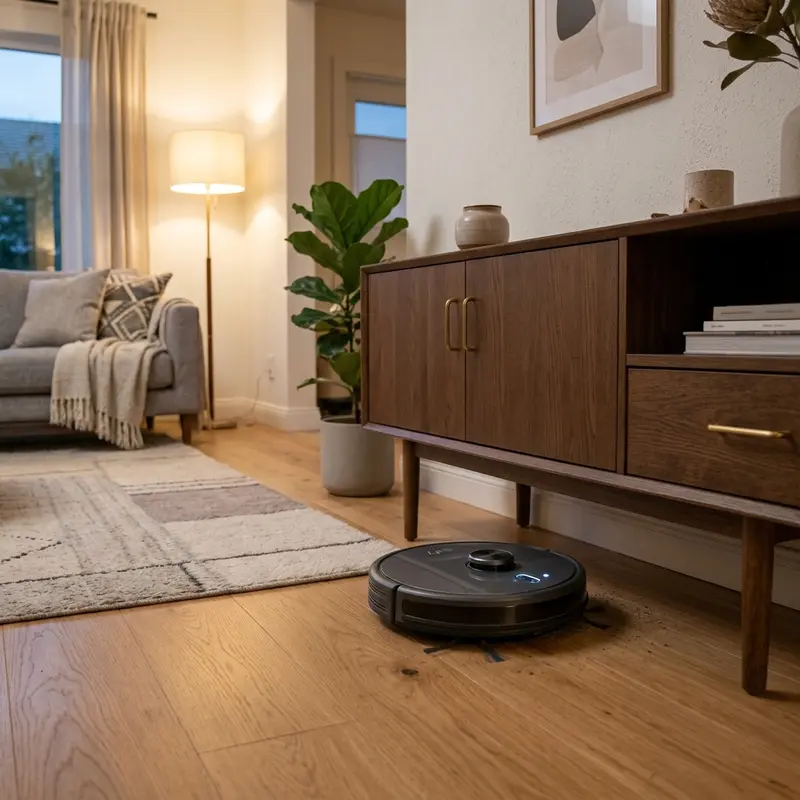
With a chassis height of only 7.5 cm, the mobility of the WAP W100 is one of its main advantages. It slips under platform beds, entertainment centers, and low couches where taller laser mapping models (which average 10 cm high due to the LiDAR turret) would get stuck.
2. Brushless Suction, Side Brushes, and Filter Assembly
In terms of vacuum performance, the WAP W100 generates a nominal static suction pressure of 250 Pa. While this is modest compared to the 2000 Pa or 3000 Pa specs of mapping vacuums, the WAP W100 makes efficient use of this power through a direct suction port without a main roller brush.
Dust and pet hair are swept to the center by two three-blade rotating side brushes that extend past the robot's frame. The direct suction port pulls dirt straight into the 250 ml dustbin. This brush-free port is ideal for pet owners since hair and fur are sucked directly into the bin without wrapping around a brush core, which often jams roller motors. The filter setup includes a washable high-density nylon mesh pre-filter and a foam filter that captures mid-sized dust particles, avoiding the need for expensive HEPA filter replacements.
3. Electrical Architecture, Drive Wheels, and Cliff Sensors
The WAP Robot W100 is powered by an 11.1V Lithium-ion battery pack with a capacity of 1500 mAh. To charge the battery, plug the AC/DC wall adapter cable directly into the P4 charging port on the side of the vacuum (it does not include a charging dock). A complete charge cycle from 0% to 100% takes about 3 to 4 hours, providing a runtime of up to 120 minutes on a single charge.
The side drive wheels are driven by DC motors with nylon reduction gearboxes, using treaded soft rubber tires to climb low thresholds up to 1.0 cm. Three infrared cliff sensors on the front underside monitor floor reflectivity. When the vacuum approaches a step, the infrared signal reflection time spikes, indicating a drop-off. The motherboard cuts power to the forward drive and reverses the wheels to steer the vacuum away from stairs.
| Specification | WAP Robot W100 | KaBuM! Smart 500 | Liectroux C30B |
|---|---|---|---|
| Target Use Case | Light daily maintenance (dust and pet hair) | Moderate sweeping and wet mopping | Heavy-duty cleaning (carpets and large layouts) |
| Navigation Type | Random pathing (bump and turn) | Systematic Gyroscope (zigzag) | Gyroscope with 2D mapping tracking |
| Chassis Height | 7.5 cm (Ultra-slim profile) | 8.2 cm | 7.8 cm |
| Suction Power | 250 Pa (Fixed) | 2000 Pa (Adjustable) | 3000 Pa (Adjustable) |
| Auto-Recharge | No (Manual adapter plugging) | Yes (Automatic docking) | Yes (Automatic docking) |
| Dustbin Capacity | 250 ml | 600 ml dust / 350 ml water | 600 ml dust / 350 ml water |
| Mopping System | Static sweep cloth attachment | Electronic micro-pump mop control | Gravity-fed mop attachment |
4. Troubleshooting Bumper Jams and Spin Faults
A common mechanical issue with the WAP Robot W100 after long-term use is a jammed front bumper. If the return spring inside the bumper becomes misaligned or fine grit accumulates in the seams, the bumper micro-switches can get stuck in the pressed position. This causes the vacuum to drive in circles or spin in place as if it is constantly hitting an obstacle.
To diagnose this issue, turn off the bottom power switch, flip the vacuum over, and remove the screws holding the front bumper cover. Clean out any dust or grit around the plastic springs and check that both mechanical micro-switches click smoothly when pressed. Repairing loose wire connections or aligning the bumper springs will restore normal navigation.
If you have other smart home devices experiencing connection issues, refer to our guide on how to share Intelbras Mibo Smart camera access to learn about user management and access permissions on home networks.
Additionally, to keep all your smart home and home automation systems communicating reliably, check our review on the best Wi-Fi router for security cameras, which discusses router placement strategies to maximize coverage through walls.

Analyzing Random Obstacle Navigation on the WAP Robot W100
The WAP Robot W100 is an entry-level robot vacuum designed for simplicity and affordability. Instead of using complex cameras or lasers, it navigates rooms randomly using physical bumpers. When the mechanical switches inside the front bumper detect an obstacle, the internal controller reverses the drive wheels, turns the chassis, and continues in a new direction.
The vacuum alternates between spiral, perimeter, and random cleaning paths. While this mechanical method requires more cleaning time to cover a complete room compared to mapped vacuums, it cleans small rooms and apartments efficiently, offering a simple cleaning solution without the need for Wi-Fi configurations or mobile apps.
Ni-MH Battery Cells and Charging Guidelines
To reduce manufacturing costs, the WAP Robot W100 is equipped with a Nickel-Metal Hydride (Ni-MH) battery pack with a capacity of 800 to 1000 mAh. This battery configuration delivers up to 100 minutes of continuous cleaning runtime, which is sufficient for small living spaces and single rooms.
Ni-MH batteries require specific charging habits to prevent "memory effect" capacity loss over time. Allow the vacuum battery to drain completely before plugging the 12V charger into the side port. The battery requires 4 to 5 hours to reach a full charge. Unplug the adapter once the indicator light turns green to extend the chemical lifespan of the cells.
Ultra-Low Chassis Profile and Maintenance Advantages
A major design benefit of the WAP Robot W100 is its slim physical profile. Standing at just 7.5 cm tall, it navigates easily under low couches, coffee tables, and cabinets. Its low operating noise allows it to run during the day without disrupting your work or home activities.
The dust bin holds 250 ml of debris and features a washable fine-mesh filter. Because it relies on direct suction without a center brush roll, pet hair and fibers cannot wrap around mechanical axles. This reduces maintenance requirements, making the WAP W100 an excellent low-cost option for basic hard floor cleaning.
Mopping Performance and Static Microfiber Sweep Cloth Use
The WAP Robot W100 features a static mopping attachment that snaps onto the bottom of the chassis. This allows the vacuum to drag a microfiber cloth behind the suction port. To use the mop effectively without draining the battery, dampen the cloth with water and a mild floor cleaner, wringing it out thoroughly before attaching it.
Never pour water directly onto the floor or into the vacuum body, as the liquid will bypass the seals and damage the suction turbine. Wash the microfiber cloth after each run to remove fine dust, ensuring optimal mopping performance. The static mop works well for light dust pick-up on tile and laminate surfaces.
Cleaning the Caster Wheel Axle to Prevent Spin Stalls
The front caster wheel on the WAP Robot W100 acts as the steering guide. If hair or thick threads wrap around the metal wheel axle, the wheel will drag rather than turn freely. This creates mechanical friction that causes the vacuum to stall during turn maneuvers. Use a pair of scissors to cut away any hair wrapped around the caster axle and wipe the wheel slot clean to maintain smooth steering mobility on hard floors.
Cleaning the Suction Intake Channel to Prevent Clogs
Because the WAP Robot W100 uses a direct suction inlet without a main rolling brush, large debris such as paper clippings or dry leaves can get lodged inside the narrow intake channel. This blockage drops suction power and causes dust to fall back onto the floor. Inspect the intake slot and wipe the plastic tunnel clean with a dry cloth during every empty cycle to maintain strong suction.
Cleaning the Cliff Sensors to Avoid Step Collision Stalls
The WAP Robot W100 uses three underside infrared sensors to detect stairs and drops. If dust blocks these optical windows, the vacuum will freeze and issue error bops, assuming it is hanging over a step. Wipe these plastic sensors with a dry microfibre cloth to clear dust build-up and maintain continuous random navigation pathing.
Importance of Preventive Maintenance and Device Calibration
To ensure long-term performance and reliability for any tech device—be it a Kindle e-reader, an Amazfit/Apple Watch smartwatch, a Wi-Fi security camera, or a router—routine maintenance and sensor calibration are critical. Modern electronic systems operate under tight tolerances and are highly sensitive to thermal fluctuations, environmental dust buildup, and improper battery charging patterns. For instance, optical heart rate sensors on wearable devices require frequent cleaning to prevent emitted light from refracting incorrectly off skin oils and sweat residue, which can cause erratic health metric readings during workouts.
Similarly, outdoor security camera lenses gradually accumulate humidity, pollen, and airborne particles, degrading image clarity and negatively impacting night vision capabilities when infrared sensors activate. Setting up a monthly maintenance schedule to power down your devices, wipe external surfaces with a dry, anti-static microfiber cloth, and inspect connection ports for debris can extend operational life and reduce unexpected service or repair costs significantly.
Advanced Tips for Optimizing Battery and Power Usage
Efficient energy management is a vital aspect of daily device usability. Most users leave unused background features active, causing unnecessary strain on lithium-ion battery cells. Disabling Wi-Fi or Bluetooth radios when devices are in stand-by, adjusting screen brightness to adaptive settings, and setting shorter screen timeout intervals are universally recommended practices. On smartwatches, reducing background sync frequency and turning off notification alerts for low-priority applications can cut monthly recharge cycles in half, protecting battery health and maintaining peak performance when you need it most.
Frequently Asked Questions (FAQ)
Does the WAP W100 return to the charging base automatically?
No. The WAP Robot W100 is an entry-level budget model and does not support automatic docking. When the battery runs low, it simply stops in the room, and you must manually connect the charging cable to the port on the side.
How does the mopping function work on the WAP W100?
The WAP W100 uses a snap-on plastic mop frame under the chassis. You must wet the microfiber cloth with water or your choice of floor cleaner, attach it to the frame, and snap it onto the vacuum. The vacuum drags the damp cloth as it sweeps.
Does the WAP W100 work on thick rugs or carpets?
It is not recommended for high-pile or thick carpets. Due to its low wheel suspension travel and lower-torque drive motors, it can easily get stuck on carpet tassels or thresholds higher than 1.0 cm.
What is the lifespan of the WAP W100 battery?
The lithium battery will hold its nominal runtime for about 300 to 500 complete charge cycles. After this, runtime will gradually decrease, but replacement battery packs are inexpensive and easy to install.
Conclusion
If you want to keep your hard floors clear of loose pet hair and dust from under low beds and sofas without spending money on a high-end laser mapping vacuum, the WAP Robot W100 is a highly practical choice. It is simple to operate, and inexpensive replacement parts ensure it remains a reliable home cleaning helper for years.




