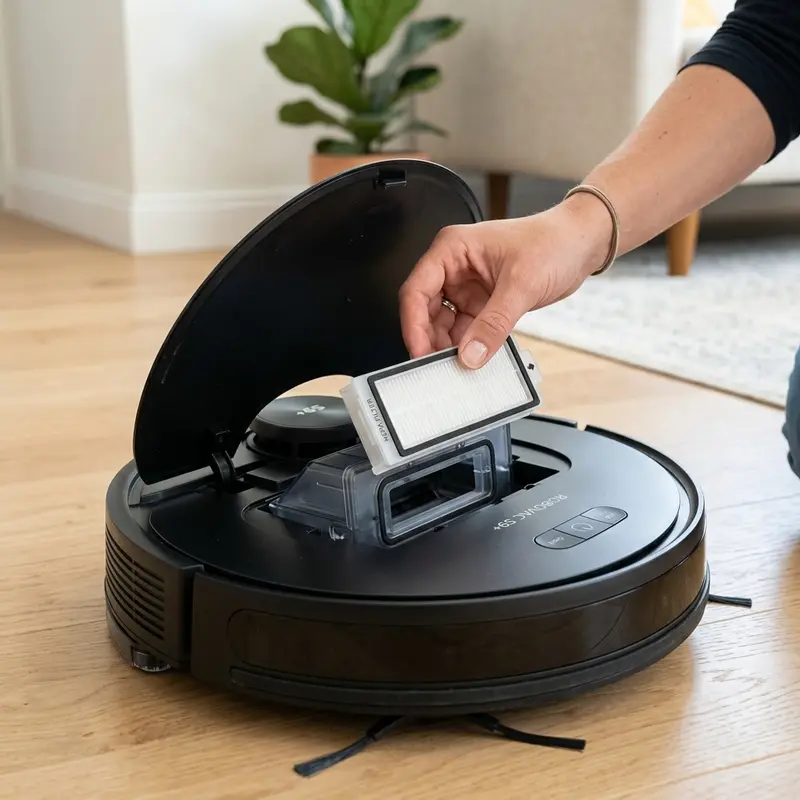
How to Clean the Filter on KaBuM! Smart 500 Robot Vacuum
If you have noticed that your KaBuM! Smart 500 robot vacuum has lost its suction power or is emitting warning beeps accompanied by a hot plastic smell near the exhaust vents, here is the technical diagnosis: the micro-fiber glass HEPA H13 filter is saturated with microscopic dust, blocking the airflow and causing high thermal resistance in the suction motor. Cleaning the HEPA filter dry on a weekly basis and replacing it every 3 to 6 months is required to restore the 2000 Pa suction rating and prevent damage to the brushless suction motor.
1. The Physics Behind HEPA H13 Filtration
The filter used in the KaBuM! Smart 500 is classified under the international standard HEPA H13 (High Efficiency Particulate Air). This medium is not a simple plastic mesh or cloth sieve. It consists of a randomly arranged mat of glass fibers with diameters ranging from 0.5 to 2.0 micrometers (microns).
The capture of microscopic particles within the HEPA filter relies on three distinct fluid dynamics mechanisms:
- Interception: Occurs when large particles following the airflow line pass within one fiber radius of a glass fiber and collide with it, becoming physically trapped;
- Inertial Impactation: Heavy dust particles, due to their mass and velocity, cannot adjust to the winding path of the airflow around the fibers. Their inertia forces them to crash directly into the glass matrix;
- Diffusion: Ultrafine particles (under 0.1 microns) collide with gas molecules in the air stream, causing them to move in a chaotic path (Brownian Motion) which increases the probability of them striking and sticking to a fiber.
By trapping 99.97% of airborne particles down to 0.3 microns, the HEPA filter prevents fine dust from blowing back into the room, protecting asthma sufferers and keeping fine dust from passing through the fan blades of the vacuum motor, which would unbalance the rotor over time.
2. Why You Must NEVER Wash a HEPA Filter with Water
This is the most common mistake made by users: washing the plissed HEPA filter under running tap water. The glass microfibers are aligned in a specific layout and carry an electrostatic charge from the factory that allows them to trap fine dust without blocking the clean air passage.
When you wash the HEPA filter, the water ruins the electrostatic charge and causes the glass fibers to clump together permanently, creating a hard, clay-like film of wet dust and cellulose. Even after drying in the sun, the airflow resistance (static pressure drop) of the washed filter increases by up to 300%. This forces the DC suction motor to draw excessive current to pull air through the blocked matrix, causing the motor temperature to rise and triggering the thermal safety switch (NTC thermistor). Therefore, HEPA maintenance must remain strictly dry, using compressed air or a soft brush.
3. Step-by-Step Dry Cleaning Procedure
To safely extend the life of your KaBuM! Smart 500 HEPA H13 filter, follow these maintenance steps:
- Switch off the vacuum's lateral power button and press the release latch at the back to slide the hybrid container out of the vacuum body;
- Open the dustbin lid, empty the debris into a garbage can, and use a brush to clear the internal plastic corners;
- Open the filter access latch on top of the hybrid container;
- Remove the mesh pre-filter and the black polyurethane foam filter. These two secondary layers are fully washable using warm water and mild dish soap to clear out heavy dust;
- Carefully lift out the white plissed HEPA filter. Tap the frame gently against the inside of your trash can to loosen the dust trapped between the paper folds;
- Use a soft-bristled brush or the cleaning tool supplied with the vacuum to clean the pleats in the direction of the folds. If available, use a can of compressed air to blow out fine dust from the clean side to the dirty side.
Verify that the foam filter is 100% dry before reinstalling. Wet foam will transfer moisture to the HEPA paper core, ruining it instantly.
4. Troubleshooting Motor Overcurrent and Suction Failures
When the robot vacuum runs for extended periods with a clogged HEPA filter, the mechanical load on the brushless suction motor rotor spikes. In brushless motors, the electronic speed controller (ESC) monitors the electric current drawn by the motor phases. With restricted airflow, the air density in the fan housing drops, changing the dynamic load on the blades.
If the current draw rises above 1.2A for more than 5 seconds because of a clogged filter, the main logic board shuts down the suction motor and triggers a beep error to protect the drive MOSFETs from thermal burnout. Using a digital multimeter configured as an ammeter in series with the motor power lead, you can verify that filter clogging raises the operating current to unsafe levels. Replacing the clogged filter drops the current back to the normal 0.6A to 0.8A range, reducing heat on the internal step-down voltage regulators.
| Filter Element | Material / Function | Is It Washable? | Recommended Cleaning Method |
|---|---|---|---|
| Mesh Pre-filter | Micro-perforated nylon for hair, lint, and large debris | Yes (100% Washable) | Rinse under tap water; dry with a microfiber cloth |
| Foam Filter | Black polyurethane foam for mid-sized dust particles | Yes (100% Washable) | Wash with mild soap; squeeze out excess water and air dry |
| HEPA H13 Filter | Plissed glass microfibers for fine dust, pollen, and mites | No (NEVER get wet) | Dry clean only using a soft brush or compressed air |
| Hybrid Dustbin | ABS plastic casing housing the electric mop pump terminals | Dust chamber only | Wipe with a damp cloth; keep electrical contact dry |
5. Network Integration and Consumables Status Tracking
The Smart Life or KaBuM! Smart mobile app tracks the usage of your vacuum's consumable parts using a software timer. The system estimates the filter lifespan in percentage based on cumulative motor runtime.
However, this is only a software estimate. The vacuum does not have an optical sensor to measure actual filter blockage. If you live in a dusty area or have multiple pets, the HEPA filter will clog long before the app timer reaches 0%. Ensure your Wi-Fi connection is stable so you can receive filter replacement alerts. If you run into notification errors with other smart devices, check our guide on what to do if the Intelbras Mibo app goes offline to optimize your smart home notification settings.
To keep the communication and status logs from your KaBuM! Smart 500 syncing reliably with your phone, see our advice on choosing the best Wi-Fi router for security cameras, which helps configure stable 2.4 GHz IoT networks.

Removing and Rinsing the 600 ml Hybrid Dustbin Container
To preserve the suction capability of your KaBuM! Smart 500, clean the 600 ml dustbin regularly. Press the locking tab on the rear of the chassis and slide the container out. Open the side lid to empty the collected dust and debris into your trash bin.
You can rinse the plastic walls of the dustbin under running water to clear fine residues. However, you must remove all filters before washing the container. Never get the inner motor contacts wet if your model features an integrated fan assembly. Allow the bin to dry in a shaded area for at least 12 hours before sliding it back into the vacuum chassis.
Cleaning the Pleated HEPA Filter Folds without Ruining the Fibers
The HEPA filter inside the KaBuM! Smart 500 consists of micro-fiber glass sheets designed to trap fine allergens. Washing a HEPA filter with water collapses the microscopic fibers, permanently blocking airflow and reducing suction. To clean it correctly, remove the filter from the bin and tap it gently against a solid surface to dislodge loose dust.
Use a soft-bristled brush to clear dust from between the pleated paper folds. Avoid using metal tools or hard brushes that could tear the filtering material. If the filter looks dark grey or shows signs of wear, replace it with a new unit. Changing the HEPA filter every 3 to 6 months protects the brushless fan motor from overheating due to airflow blockages.
Replacing Consumables: Gaskets, Side Brushes, and HEPA Mesh
Consumables such as the secondary mesh filter, rubber gaskets, and side brushes require periodic inspection. Bent or frayed side brushes will fail to sweep dust into the suction path, reducing cleaning efficiency. Buying replacement kits every six months ensures the vacuum operates at peak performance, keeping your home's air clean and dust-free.
Maintaining the Secondary Plastic Fine-Mesh Filter
The dust container of the KaBuM! Smart 500 uses a two-stage filtration system. Before air reaches the pleated HEPA filter, it passes through a secondary fine-mesh plastic screen. This screen captures hair, pet fur, and large dust fibers. If the mesh filter is not cleaned regularly, debris will clog the screen, restricting airflow and forcing fine dust directly into the HEPA filter folds.
Wipe down the plastic mesh screen with a damp cloth or rinse it under water during every empty cycle. Ensure the mesh is completely dry before reassembling. Keeping the secondary mesh clear blocks large particles from clogging the HEPA filter, extending the HEPA filter's service life and maintaining strong suction performance over long cleaning cycles.
Checking the Clean Air Duct Inlet for Obstructive Clutter
When cleaning the HEPA filter on your KaBuM! Smart 500, always inspect the internal air duct inlet situated inside the dustbin slot. Fine pet fur and carpet lint can escape the gaskets and collect in the plastic channel leading to the suction motor impeller. If this channel is blocked, the vacuum will experience restricted airflow and low suction power. Clean out any debris in the channel with a flexible brush during every HEPA filter replacement cycle.
Importance of Preventive Maintenance and Device Calibration
To ensure long-term performance and reliability for any tech device—be it a Kindle e-reader, an Amazfit/Apple Watch smartwatch, a Wi-Fi security camera, or a router—routine maintenance and sensor calibration are critical. Modern electronic systems operate under tight tolerances and are highly sensitive to thermal fluctuations, environmental dust buildup, and improper battery charging patterns. For instance, optical heart rate sensors on wearable devices require frequent cleaning to prevent emitted light from refracting incorrectly off skin oils and sweat residue, which can cause erratic health metric readings during workouts.
Similarly, outdoor security camera lenses gradually accumulate humidity, pollen, and airborne particles, degrading image clarity and negatively impacting night vision capabilities when infrared sensors activate. Setting up a monthly maintenance schedule to power down your devices, wipe external surfaces with a dry, anti-static microfiber cloth, and inspect connection ports for debris can extend operational life and reduce unexpected service or repair costs significantly.
Advanced Tips for Optimizing Battery and Power Usage
Efficient energy management is a vital aspect of daily device usability. Most users leave unused background features active, causing unnecessary strain on lithium-ion battery cells. Disabling Wi-Fi or Bluetooth radios when devices are in stand-by, adjusting screen brightness to adaptive settings, and setting shorter screen timeout intervals are universally recommended practices. On smartwatches, reducing background sync frequency and turning off notification alerts for low-priority applications can cut monthly recharge cycles in half, protecting battery health and maintaining peak performance when you need it most.
Frequently Asked Questions (FAQ)
Can I vacuum plaster dust or flour with the KaBuM! Smart 500?
No. Plaster dust, cement dust, flour, and talcum powder are extremely fine. They will clog the HEPA filter instantly and can bypass the seals, entering the motor bearings and locking them.
How often should I replace the HEPA filter?
Under normal daily use, we recommend replacing the HEPA filter with a new one every 3 to 6 months, depending on the amount of dust and pet hair in your home.
Can I run the vacuum without the HEPA filter?
Never run the vacuum without the HEPA filter installed. Dust will be sucked directly into the impeller fan, damaging the blades and burning out the motor due to friction and overheating.
How do I reset the filter life timer in the app?
After replacing the filter, open the Smart Life app, go to Settings, choose Consumibles/Maintenance, select Filter, and tap the reset button.
Conclusion
Cleaning the filter on your KaBuM! Smart 500 is the most effective way to maintain its cleaning performance. Spending a few minutes each week to brush off the plissed HEPA H13 filter ensures the vacuum maintains its 2000 Pa suction rating, protects the motor from overheating, and saves battery by reducing mechanical resistance.




