Connecting two JBL speakers together can enhance your audio experience significantly. Utilizing features like JBL Connect, Connect+, and PartyBoost, users can easily pair multiple speakers to create a more immersive sound environment. Understanding the differences between these technologies is vital for seamless connectivity and optimal performance. This blog post will guide you through the necessary steps and important considerations when linking two JBL speakers together.
When it comes to connecting speakers, the distinction between JBL's various technologies is essential. JBL Connect allows users to pair certain models for stereo sound. However, the introduction of JBL Connect+ expanded the number of speakers that could be connected simultaneously, accommodating up to 100 compatible devices. The latest technology, JBL PartyBoost, is designed to connect newer JBL speakers together, offering an enhanced audio experience but is incompatible with older models that utilize Connect or Connect+. This differentiation is crucial for users who wish to maximize their speaker's potential while avoiding connectivity issues.
Understanding the significance of these protocols is not just a matter of convenience; it impacts audio quality and speaker performance. For instance, using PartyBoost with compatible models ensures that sound is synchronized and maintains fidelity across multiple speakers. On the contrary, attempting to mix Connect+ and PartyBoost speakers will lead to connectivity failures and a subpar listening experience. Hence, recognizing which models are compatible with each protocol is vital for achieving the desired audio output.
Core Tutorial: Step-by-Step Instructions and Settings
Publicidade
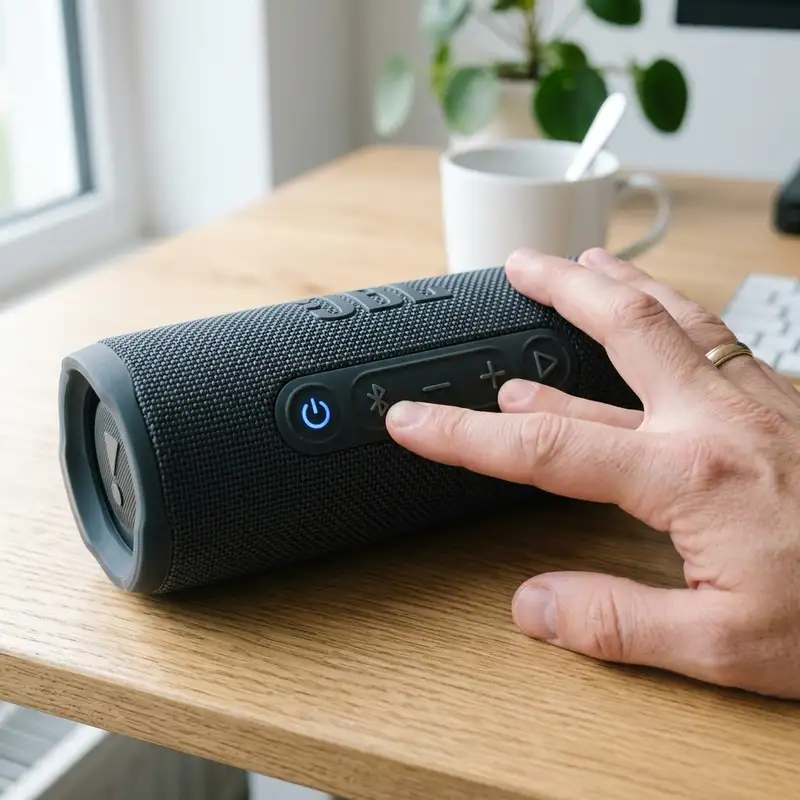
Connecting two JBL speakers can be accomplished through physical buttons or the JBL Portable app, depending on user preference. To initiate the process using the physical buttons, ensure that both speakers are powered on. For speakers that support JBL Connect or Connect+, locate the “Connect” button, which is typically represented by a chain link icon. Press and hold this button on the first speaker until it begins to blink, indicating it is searching for additional devices. Next, press the same button on the second speaker. This action will pair the two devices together, allowing for a synchronized audio experience.
For users who prefer using the JBL Portable app, the process is straightforward but requires a compatible smartphone or tablet. First, download and install the JBL Portable app from the relevant app store. Open the app, and ensure Bluetooth is enabled on your device. Within the app, select the speaker you wish to connect. Then, find the “PartyBoost” or “Connect+” option, depending on the speakers being used. The app will guide users through the pairing process, facilitating a connection between the two speakers. The app also allows for additional settings adjustments, enhancing user control over the audio experience.
Regardless of the method chosen, it is important to ensure that both speakers are within the recommended range for optimal connectivity. The general rule is to keep the speakers within a distance of approximately 30 feet (10 meters) to prevent disconnections or audio lag. Users should also be aware that environmental factors, such as walls and interference from other wireless devices, can impact connectivity performance.
Compatibility Table
Publicidade
To further clarify the differences and compatibility between JBL's various speaker connection protocols, the following table compares the key specifications of JBL Connect, Connect+, and PartyBoost.
Protocol
Max Connected Units
Range
Compatible Models
JBL Connect
Up to 2
30 feet (10 meters)
JBL Charge 3, Flip 4
JBL Connect+
Up to 100
30 feet (10 meters)
JBL Charge 4, Flip 5, Flip 6
JBL PartyBoost
Up to 100
30 feet (10 meters)
JBL Flip 5, Charge 5, Boombox 2, Boombox 3
This table highlights the essential features of each protocol, providing a clear overview of the maximum number of units that can be connected, their operational range, and the models compatible with each technology. It is crucial to adhere to these specifications to ensure optimal functionality and performance. Mixing devices from different protocols is not supported and can result in connectivity failures.
Publicidade
Additional Resources and Recommended Links
For those seeking further information or assistance, additional resources are available to enhance the understanding of JBL speakers. Topics such as how to reset a JBL speaker and connecting Alexa to a JBL speaker provide valuable insights that can improve user experience with JBL products. It is advisable to explore these links for comprehensive guidance on maximizing the functionality of JBL speakers.
For official support and detailed documentation, JBL's customer support page is a reliable external resource. More information can be found at the [JBL Support Page](https://support.jbl.com).
Detailed Technical Troubleshooting, Advanced Settings, or Hardware Checks
In the realm of connecting two JBL speakers using PartyBoost or Connect+, technical troubleshooting can be essential when facing connectivity issues. A systematic approach to diagnosing the problem is necessary to ensure optimal performance. Start by verifying that both speakers are fully charged. Insufficient battery levels can lead to intermittent connections or complete failure to link. It is advisable to use the original charging cables and adapters to eliminate the possibility of voltage inconsistencies that could affect the connection process.
Next, confirm that both speakers are compatible with the PartyBoost or Connect+ feature. Many JBL models are equipped with this functionality, but not all. A quick reference to the user manual or JBL's official website can clarify compatibility. This step is crucial because attempting to connect an incompatible speaker model can lead to frustration and unsuccessful pairing attempts. Proper identification of the model numbers and features will streamline the troubleshooting process significantly.
Another essential step involves resetting the Bluetooth settings on both devices. This can often resolve connection issues stemming from residual settings or previous connections. To perform a reset, turn off both speakers and then press and hold the Bluetooth button for approximately 10 seconds. Once reset, the speakers should revert to factory settings, allowing for a fresh connection attempt. Following this, ensure that the speakers are in close proximity to each other, as distance can affect Bluetooth performance. Ideally, keeping the speakers within a range of 30 feet will help maintain a stable connection.
Environmental factors should also be evaluated when troubleshooting connectivity. Obstacles such as walls, furniture, or other electronic devices may interfere with the Bluetooth signal. It is recommended to conduct tests in open spaces where potential signal obstructions are minimized. Additionally, turning off nearby devices that may cause interference, such as Wi-Fi routers or microwaves, can enhance the integrity of the Bluetooth connection. If issues persist, checking for software updates on both speakers is advisable. Manufacturers frequently release firmware updates to enhance performance and fix bugs, so ensuring both devices are on the latest version can significantly impact connectivity.
Lastly, if all troubleshooting steps fail, consider contacting JBL customer support for further assistance. They possess the expertise to address specific issues that may not be covered in the user manual. Providing them with detailed information about the problem, including error messages or unusual behavior, will facilitate a faster resolution. Professional support can be invaluable in navigating complex technical issues that arise during the connection process.
Preventative Maintenance, Battery Protection Practices, or Compatibility Insights
Publicidade
Maintaining the longevity and performance of JBL speakers requires diligent preventative maintenance and battery protection practices. One of the most critical aspects of speaker care involves proper charging techniques. Avoid allowing the battery to completely drain before charging, as lithium-ion batteries can suffer from reduced capacity over time if subjected to deep discharges. It is advisable to charge the speakers when they reach around 20% battery life, which helps in sustaining their overall health and maximizing lifespan.
Routine cleaning is also an essential part of maintenance. Dust and debris can accumulate in speaker grilles and controls, affecting sound quality and performance. Using a soft, damp cloth to gently wipe the surfaces can prevent buildup. Special attention should be given to the ports and buttons, as these areas can harbor grime that interferes with functionality. Additionally, it is essential to avoid exposing the speakers to harsh environmental elements such as excessive humidity, extreme temperatures, or direct sunlight, as these factors can cause damage to the internal components.
Battery care extends to the storage of speakers. When not in use for an extended period, it is advisable to store the speakers at around 50% charge. This practice helps in preserving battery health, allowing the lithium-ion cells to remain in optimal condition. Keeping the speakers in a cool, dry place will further enhance their longevity. Remember, high temperatures can accelerate battery degradation, leading to reduced performance and shorter usage times.
Compatibility is another critical facet to consider when connecting two JBL speakers. Not all models support PartyBoost or Connect+, and understanding the specifications of each device is vital. Some speakers are designed for linking with older technologies, such as Connect+, while newer models may support only PartyBoost. To ensure seamless connectivity, it may be necessary to upgrade to compatible models if existing speakers do not support the desired features. This information can typically be found on the JBL website or in the user manuals, ensuring informed purchasing decisions.
Lastly, monitoring speaker performance through regular use can provide insights into any potential issues before they escalate. Paying attention to changes in sound quality, connectivity, or battery life can signal when maintenance or troubleshooting is required. By being proactive in these areas, long-term enjoyment and functionality of JBL speakers can be significantly enhanced.
DomineTec Tip: Regularly check for firmware updates and subscribe to notifications from JBL. Keeping speakers updated ensures the best performance and access to new features.
Publicidade
Long Term Expectations, Technology Landscape, and Expert Recommendations
When considering the long-term expectations of JBL speakers connected via PartyBoost or Connect+, it is essential to acknowledge the evolving technology landscape. As Bluetooth technology advances, the capabilities of audio devices expand, leading to improved sound quality, connection stability, and additional features. Expect future iterations of JBL speakers to incorporate enhanced sound processing algorithms, resulting in richer audio experiences and clearer sound reproduction. The ongoing development in wireless audio technology suggests that JBL will continue to innovate, offering consumers increasingly sophisticated products.
Battery life is another critical consideration for long-term use. Current JBL models typically offer substantial playback time, but as usage patterns evolve, the demand for longer-lasting batteries becomes apparent. Future models may integrate more energy-efficient components and advanced battery management systems that prolong playtime and reduce charging times. Additionally, innovations such as solar charging or energy harvesting could emerge, allowing for more sustainable usage patterns, catering to eco-conscious consumers.
Compatibility has become a focal point in the audio technology sector. As more brands adopt proprietary technologies, the importance of ensuring that devices can seamlessly connect and communicate will intensify. JBL has made strides in addressing compatibility issues through the PartyBoost feature, but as new technologies emerge, consumers may seek comprehensive solutions that allow for cross-brand connectivity. Recommendations for future purchases should prioritize devices that not only support current features but also showcase future compatibility with emerging technologies.
Expert recommendations suggest that consumers remain informed about the latest trends in Bluetooth technology, audio processing, and speaker design. Investing in premium models that offer comprehensive support for various connectivity options will ensure that users can adapt to future changes in the audio landscape. Additionally, consulting user reviews and product comparisons can provide insights into performance over time, guiding consumers in making informed decisions that align with their needs.
As JBL continues to evolve its product offerings, keeping abreast of industry trends and technological advancements will be crucial for users. Engaging with online communities and forums dedicated to audio technology can also provide valuable insights and support. By fostering an informed user base, JBL can ensure that its speakers remain a top choice for consumers seeking quality audio experiences, both now and in the future.