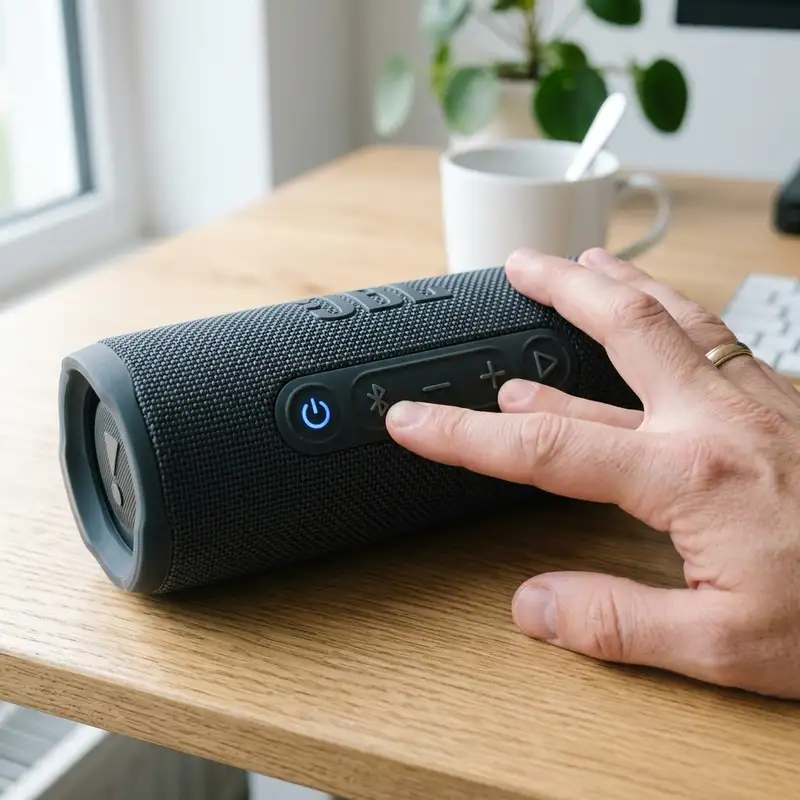
Portable Bluetooth speakers engineered by JBL—such as the Flip, Charge, Pulse, and Boombox series—are highly regarded for their acoustic performance, rugged waterproofing, and physical durability. However, because these devices run on dedicated microcontrollers executing embedded real-time operating systems (RTOS), they are susceptible to firmware deadlocks, Bluetooth stack corruption, and power management state errors. Common symptoms of system failures include frozen status LEDs, a refusal to establish wireless pairings, failure to charge, or unresponsive physical control buttons.
To factory reset a JBL speaker, press and hold the Volume + and Play/Pause (or Bluetooth) buttons for 5 seconds until it powers down. This operation clears the flash memory, erasing all cached Bluetooth pairings and local configuration data.
1. The Bluetooth Protocol Stack and why RF Link Cache Corruption Occurs
To understand why a hardware-level reset is necessary, one must examine the RF communications stack implemented in JBL speaker chipsets (typically sourced from Qualcomm/CSR or Realtek). The Bluetooth controller operates in the congested 2.4-GHz radio frequency band designated for industrial, scientific, and medical communications. Physical connection parameters and cryptographic keys—known as Link Keys—are negotiated using the Advanced Audio Distribution Profile (A2DP) for stereo audio streaming, the Audio/Video Remote Control Profile (AVRCP) for media command mapping, and the Hands-Free Profile (HFP) for telephony services.
During a standard connection handshake, these Link Keys are committed to the speaker's non-volatile EEPROM memory. If a smartphone or laptop attempts to reconnect while the speaker is experiencing RF packets collisions, or if the pairing table becomes full due to multiple historical hosts, the database table can become corrupted. Consequently, the microcontroller enters a deadlock state, rejecting all incoming connection requests. Executing a hard factory reset formats this internal database partition, clearing the host registry and allowing the GFSK radio transceivers to broadcast clean discovery beacons.
In addition to local pairing tables, modern Bluetooth transceivers employ adaptive frequency hopping (AFH) mechanisms to dynamically scan and avoid active Wi-Fi channels. If the internal AFH mapping table is corrupted by transient electromagnetic fields, the speaker's radio will attempt connection procedures on degraded or blocked channels. This causes high packet loss, audio stutters, and eventual link termination. Resetting the device erases the AFH cache, initiating a clean spectral analysis of the local 2.4 GHz environment upon the next boot sequence.
2. Physical Power Diagnostics: Charging Contacts, Voltage Drops, and Battery Sleep
Before proceeding with software-based troubleshooting, it is essential to rule out physical power delivery failures. Many issues reported as firmware freezes are actually battery protection shutdowns. JBL portable speakers use lithium-ion polymer (Li-Po) cells, which have a typical lifespan of 300 to 500 complete discharge cycles. Over time, chemical degradation increases internal cell resistance, leading to rapid voltage drops under high-volume audio output.
When the cell voltage drops below a critical threshold (typically 3.0V), the internal Protection Circuit Module (PCM) disconnects the battery terminals to prevent deep discharge. To diagnose and resolve battery-related issues, follow this systematic guide:
- Port Cleaning: Debris, pocket lint, and micro-particles inside the USB-C or micro-USB charging port create a high-resistance barrier. Use an anti-static brush and 99.9% isopropyl alcohol to scrub the port contacts clean. Do not use water or household cleaning solutions.
- Voltage Verification: Ensure your USB power adapter provides a stable 5V DC output with at least 2.0A of current capacity. Chargers lacking proper Power Delivery (PD) negotiation can cause the speaker's power management IC (PMIC) to trigger overcurrent protection.
- Trickle Recovery: If the speaker has been completely discharged for several months, the battery may have entered deep sleep. Connect it to a low-amperage charger for at least 4 hours to allow the PMIC to safely trickle-charge the cell back to its nominal voltage.
Inside the battery pack, a specialized fuel gauge integrated circuit measures current flow (coulomb counting) and cell surface temperature. When charging cycles are disrupted or when the battery remains depleted for long periods, the fuel gauge calibration shifts out of alignment, resulting in false capacity readouts. The microcontroller might read 100% capacity while the actual stored charge is insufficient to drive the amplifiers. A prolonged low-current charging cycle recalibrates the fuel gauge, aligning the physical charge with the logic readings.
3. Step-by-Step Reset Procedures for Flip and Charge Models

The logical boards of the JBL Flip series (Flip 4, Flip 5, Flip 6) and JBL Charge series (Charge 3, Charge 4, Charge 5) share similar power and button configurations, though the button layouts vary slightly between device generations.
To reset these models, ensure the speaker is powered on and execute the following button combinations:
- JBL Charge 3, Charge 4, Flip 4, and Flip 5: Press and hold the Volume + and Play/Pause buttons simultaneously. Keep them held for 3 to 5 seconds. The light around the power button will flash, indicating a successful memory wipe, and the speaker will automatically shut down.
- JBL Charge 5 and Flip 6: On these newer models, locate the Volume + and Play/Pause buttons on the rubberized interface. Press and hold them together for at least 5 seconds. On some regional firmware variations, you must press the Volume + and Bluetooth buttons instead. The vertical LED battery indicator bar will blink rapidly before the unit powers off.
- Re-pairing: Connect the speaker to a power source, turn it on, and verify that the power button is glowing blue or flashing rapidly. This indicates the RF controller has successfully entered pairing mode.
Troubleshooting connection errors often extends to the host device's networking stack. If your speaker continues to disconnect, you may need to resolve wider network errors. For instance, some users reset their mobile devices, needing to change Wi-Fi password or reset the phone's networking profiles, which flushes the mobile Bluetooth cache and removes corrupt registry entries.
During the reset process, the speaker's digital signal processor (DSP) is also reinitialized. The DSP handles real-time dynamic equalization (Dynamic EQ), adjusting crossover frequencies and limiting high-frequency audio spikes to prevent speaker driver damage at max volume. If the DSP suffers from an address mapping error, the speaker may output muffled audio or no bass at all. Resetting the device clears the DSP's working RAM, restoring the factory EQ parameters for optimal acoustic response.

4. Restoring JBL Boombox, Xtreme, and Go Models
For high-capacity models like the JBL Boombox (Boombox 1, 2, and 3) and Xtreme (Xtreme 1, 2, and 3), as well as the entry-level JBL Go (Go 2 and Go 3), specialized firmware layouts are used to handle multipoint connections and party pairing functions.
Follow these specific reset steps for these speakers:
Resetting JBL Boombox and Xtreme
Turn on the device. Press and hold the Volume + and Play/Pause buttons simultaneously for approximately 10 seconds. The illuminated power ring will turn off, and the speaker will restart. All stored host pairings will be deleted, and the device will boot into default factory settings.
Resetting JBL Go 2 and Go 3
The ultra-portable JBL Go requires a different button combination. With the speaker powered on, press and hold the Volume + and Bluetooth buttons together for 5 to 10 seconds. The status LED will turn off, indicating that the microcontroller has completed its memory wipe. Turn the speaker back on to start pairing.
Understanding how different audio devices handle Bluetooth configurations can help you manage your wireless ecosystem. For example, if you also use wireless headphones, learning how to pair JBL headphones will prevent profile collisions when switching between portable speakers and personal audio gear on the same phone.
The Boombox series features dual-bridge Class-D audio amplifiers that require symmetric electrical current distribution. In rare instances, logical conflicts in the amplifier's thermal shutdown subroutine can cause the speaker to enter a protect mode, disabling audio while the LEDs remain active. A hardware button reset performs a hard power cycle on the thermal sensors and amplifier ICs, resolving false protection triggers and restoring full output power to the acoustic transducers.
5. Reference Table: Button Combinations and LED Feedback by JBL Model

To assist in executing the correct reset sequence, use the comprehensive reference table below. This table maps the button combinations, holding times, and LED behaviors for all major JBL portable speaker lines.
| JBL Speaker Model | Required Button Combination | Duration | LED Visual Feedback | Post-Reset Behavior |
|---|---|---|---|---|
| JBL Flip 4 / Flip 5 | Volume + and Play/Pause | 3 - 5 seconds | Power button LED flashes and turns off | Enters Bluetooth discovery mode immediately upon power-on |
| JBL Flip 6 | Volume + and Play/Pause (or Bluetooth) | 5 seconds | LED flashes red and white 3 times | Powers off; enters discovery mode on next boot |
| JBL Charge 3 / Charge 4 | Volume + and Play/Pause | 5 seconds | Battery indicator LEDs flash and turn off | Cached device history completely cleared |
| JBL Charge 5 | Volume + and Bluetooth | 5 - 8 seconds | Main LED bar flashes white and shuts down | Restores factory default profiles and enters pairing |
| JBL Boombox (1, 2, 3) | Volume + and Play/Pause | 10 seconds | Power button light shuts off entirely | Resets firmware cache and multipoint tables |
| JBL Go (2, 3) | Volume + and Bluetooth | 5 - 10 seconds | Top status LED flashes red and turns off | Ready to pair with a new host device |
6. Resolving the Accidental "LQR / Retail Demo Mode" Trap
A common issue when trying to reset a JBL speaker is the accidental activation of "Retail Demo Mode" (also referred to as LQR mode). Retail stores use this mode to lock the speakers, allowing them to play preloaded audio without allowing customers to connect via Bluetooth or turn off the device. When demo mode is active, the speaker will only power on when plugged into a charger, the Bluetooth transceivers are disabled, and the power button will not turn off the device.
To exit this locked state, a standard factory reset will not work. You must follow this manual unlocking sequence:
- Connect the speaker to a verified USB charger to power the internal logic board.
- Power on the speaker.
- Press and hold the Bluetooth and Play/Pause buttons simultaneously for 10 to 15 seconds.
- If you are using a JBL PartyBox or Go 3, you may need to hold the Volume + and Bluetooth buttons for 15 seconds.
- The speaker will restart, the LEDs will cycle, and the battery and Bluetooth transceiver will return to their normal operational states. Once unlocked, the speaker can be paired with any Bluetooth device normally, and you can access all features through the official JBL Portable application. This retail configuration is specifically designed to run a looped demonstration program from the internal flash memory, disabling physical input ports to prevent settings modifications. Power cycling the speaker while holding down the Bluetooth and Play keys forces the hardware controller to exit this loop, rebooting the firmware into standard user mode.
The demo configuration is stored in a write-protected block of the speaker's flash memory. When activated, it interrupts the standard boot sequence of the embedded OS, disabling the power management routines that monitor battery capacity and shutting down the Bluetooth subsystem's radio frequencies. Unlocking the device restores the normal pointer address in the boot loader, permitting the system to boot into standard operational mode.
DomineTec Tip: A factory reset removes all paired device profiles and restores the default sound signature on your JBL speaker.
Frequently Asked Questions
How can I verify if my JBL speaker is an original or a fake?
Original JBL speakers have high-quality, textured fabric grilles, rubberized end caps with no visible seams, and have a heavy, solid feel due to the magnets in the drivers. When powered on, the speaker plays the signature JBL startup sound in high fidelity without distortion. The charging port should be firmly aligned, feature the official orange branding inside, and have a serial number printed under the protective rubber flap.
Why does my JBL speaker turn off by itself even when charged?
JBL speakers feature an Auto-Standby battery saving system. If the speaker does not receive an active audio signal from the host device for 10 to 15 minutes, it will automatically shut down. However, if it shuts down immediately under high volume, this indicates battery degradation: the lithium-ion battery can no longer maintain voltage stability under load, triggering the protection circuit to shut down the speaker to prevent battery failure.
Does performing a factory reset downgrade my speaker's firmware?
No. A factory reset only formats the user data partition (EEPROM), which stores Bluetooth pairing keys, volume history, and equalizer presets. The core operating system and firmware upgrades remain stored on the non-volatile ROM, ensuring your speaker runs on the latest installed firmware version even after a reset.
What should I do if my JBL Flip or Charge won't charge?
First, inspect the USB charging port for dirt, lint, or signs of oxidation, and clean it using isopropyl alcohol and a small brush. Switch your USB cable and charging adapter to rule out accessory failure. If the charging indicator LEDs still fail to light up, the internal charging controller IC or the lithium battery may be damaged, requiring professional repair.
Conclusion
Performing a factory reset on your JBL speaker is the most reliable way to fix Bluetooth connectivity errors and unresponsive controls caused by firmware deadlocks. By utilizing the correct button combinations for Flip, Charge, Boombox, and Go models, you can clear the RF controller's memory and restore stable audio performance. Keeping your ports clean and avoiding the demo mode trap will ensure your speaker remains functional for years of portable audio enjoyment.




