Cheapest Robot Vacuums with LiDAR and Mapping Features
When looking to optimize your cleaning routine, the cheapest robot vacuums with mapping features utilize gyroscope-based coordinate navigation, such as the Liectroux C30B or KaBuM! Smart 500. Unlike random bounce entry-level models, gyroscopic vacuums map your home layout in real-time on a mobile screen, ensuring they sweep in organized rows. Understanding the difference between gyroscope and laser LiDAR mapping is essential to buy the best unit.
1. How Gyroscopic Coordinate Mapping Works
Gyroscopic robot vacuums track their coordinates using built-in Inertial Measurement Units (IMUs). These sensors compute wheel rotation counts and heading angles. Combining this physical odometry data allows the motherboard to log cleaning paths on a coordinate grid.
This layout ensures the robot cleans in straight, parallel lines, reducing overlapping paths and sweeping up to 90% of the floor space. However, these maps are purely visual; users cannot draw virtual boundaries or exclude rooms directly on the screen. To learn more about entry-level layouts, check our review on whether the Mondial Pratic Clean vacuum is worth the money.
2. Upgrading to Active Laser Mapping (LiDAR / LDS)
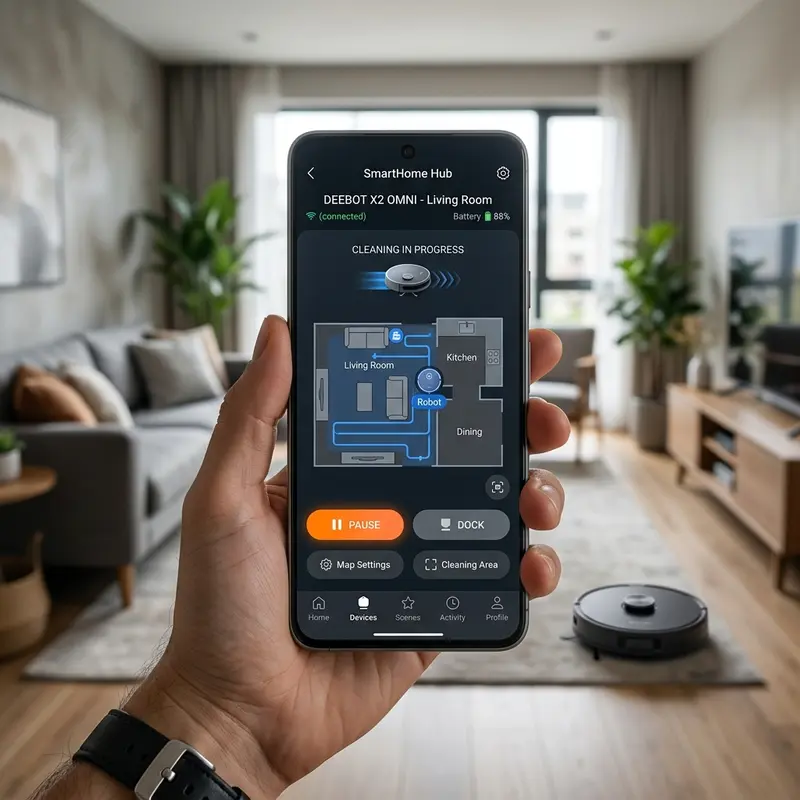
If you want full control over your cleaning paths, including virtual walls, no-go zones, and custom room cleaning orders, laser LiDAR is necessary. Although LiDAR models are typically more expensive, there are value-oriented options that offer laser mapping at affordable prices.
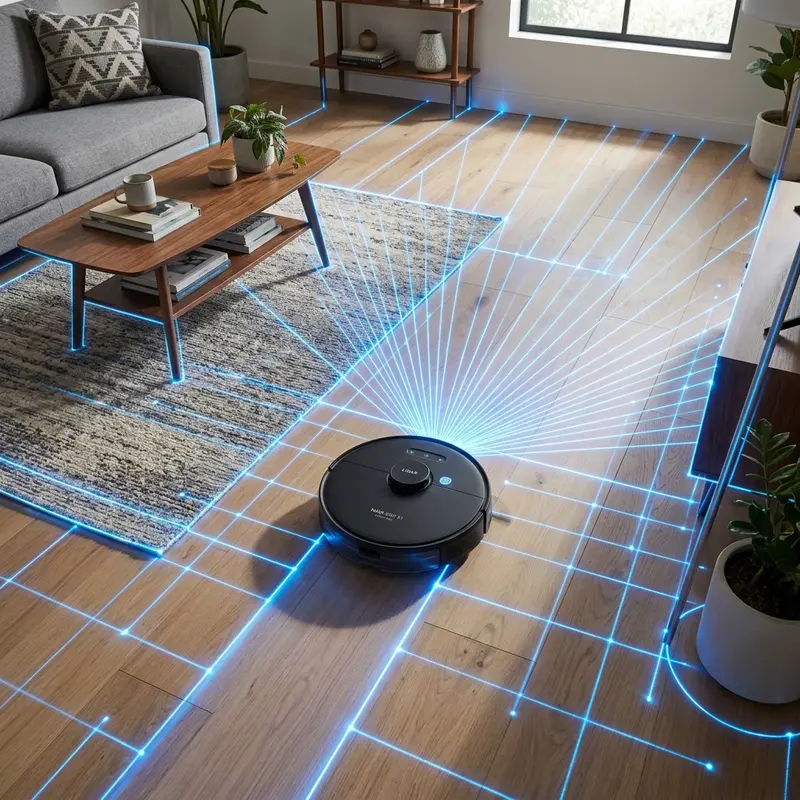
LDS systems operate using laser Time-of-Flight (ToF) calculations:
- Rotating Laser Turret: The top turret shoots invisible laser beams that bounce off walls and objects.
- Distance Computing: The vacuum measures the round-trip flight time of the light beam in milliseconds.
- Interactive Maps: The software builds a precise floor plan, allowing users to isolate carpets or bathrooms.
If you have questions about setting up your vacuum controller app, read our guide on how to control robot vacuum with smartphone remote.
3. Technical Features of Budget Mapping Vacuums
The table below lists the specifications for the most affordable robot vacuums with mapping capabilities:
| Model Name | Mapping Method | Map Interactivity | Suction Power | Dark Room Navigation |
|---|---|---|---|---|
| Liectroux C30B | Gyroscopic (IMU) | Low (Visual layout only) | 3000 Pa | Yes (Optical independent) |
| KaBuM! Smart 500 | Gyroscopic (IMU) | Low (Visual layout only) | 1600 Pa | Yes (Optical independent) |
| KaBuM! Smart 700 | Laser (LiDAR) | High (Virtual walls / rooms) | 2200 Pa | Yes (Active laser scanning) |
| Mondial Fast Clean | None (Random Bounce) | N/A | 1200 Pa | Yes (Mechanical contact) |
4. Limits of Budget Gyroscope Mapping
While gyroscopic vacuums clean systematically, they do not save the floor map. The grid resets each time a new cleaning run starts. If the robot gets stuck or is picked up, it loses its coordinate tracking, restarting the map from scratch. Furthermore, these entry-level units cannot recognize small floor items like charger cables, requiring you to clear the floor before starting the sweep.
5. Key Factors to Evaluate in Value Mapping Vacuums
When buying a budget mapping vacuum, make sure the manufacturer provides regular app updates. Glitchy software that drops Wi-Fi connections renders live maps useless. Look for brands with established local support that offer easy access to consumables like HEPA filters and replacement side brushes.
Wheel Slippage Odometry Correction and Kalman Filtering Algorithms
Budget-friendly mapping vacuums calculate their position using wheel odometry encoders. However, wheel slippage on wet or dusty tiles introduces errors, making the robot miscalculate its coordinates. To correct these discrepancies, mid-range models utilize Kalman filtering algorithms that merge wheel tick metrics with angular rate data from internal gyroscopes.
To reduce odometry errors, clean the rubber tire treads weekly. Removing dust from the wheels prevents slippage, helping the navigation software build more accurate path maps during cleaning cycles.
Persistent Coordinate Map Saving Formats and Flash Write Limits
Unlike premium LiDAR models that save permanent floor plans, budget gyroscopic vacuums construct temporary maps using 2D occupancy grids that reset after each cleaning cycle. The limited RAM (often under 64MB) on entry-level vacuums cannot support permanent coordinate maps or multi-floor storage.
If you require persistent maps to draw virtual walls, a laser-guided LiDAR vacuum is necessary. These models save maps to internal flash memory, allowing custom room scheduling and restricted zone configurations via the app.
Grid Map Discretization Resolution and RAM Bounds in Entry-Level CPUs
Mapping systems discretize floor plans into digital grid maps composed of cells (usually 5 cm by 5 cm). Each cell holds a probability value representing whether the space is free, occupied, or unexplored. The processor continuously updates these cell values during clean runs.
To conserve RAM on cheaper microcontrollers, the grid resolution is often reduced (using 10 cm cells). This is why maps on budget apps look blocky or pixelated, whereas LiDAR vacuums generate high-definition floor maps.
Kalman Filter Application on Odometry Sensors and Accelerometers
Gyroscopic mapping vacuums utilize Kalman filtering algorithms to merge wheel encoder ticks with gyroscope angle updates. Since wheels can slip on wet or polished tiles, relying on odometry alone creates position drifts. The Kalman filter processes both datasets to output stable coordinates.
Clean the rubber tires weekly to prevent slippage. Wheel slippage distorts coordinate tracking, causing the navigation software to miss rooms or repeat clean paths.
Room Boundary Segmentation Methods in Occupancy Grids
Unlike gyroscopic models that clear map data after cleaning, LiDAR-equipped robot vacuums save persistent floor plans in internal memory, allowing custom room segmentation and zoning configurations in the app.
This saving capability enables users to configure no-go zones around pet bowls or cables. If you require virtual walls, investing in a value-focused LiDAR model is highly recommended.
Coordinate Grid Discretization Precision and CPU Power Limits
Robot vacuums map spaces by discretizing layouts into coordinate grid cells (usually 5 cm by 5 cm). Cheaper microcontrollers with limited RAM use lower grid resolutions (10 cm cells) to conserve CPU cycles.
This is why maps on budget apps look blocky or pixelated, whereas LiDAR vacuums generate high-definition layout maps for custom clean scheduling.
Low-Cost LiDAR Triangulation Ranging vs Phase Difference ToF
Affordable laser mapping vacuums use triangulation-based LiDAR. The LDS dome shoots a laser spot that reflects onto a CMOS image sensor. The internal chip calculates the distance by measuring the position of the reflected spot on the image sensor.
While cheaper to build than phase-shift ToF sensors, triangulation is sensitive to bright ambient light. Close window shades in sunny rooms to maintain mapping stability during daytime cleans.
Angular Sweep Resolution and Point Cloud Sample Densities
Angular resolution determines the vacuum's ability to map thin legs and cords. Budget LiDAR sensors rotate scanning distances every 1 degree of rotation, producing a point cloud of 360 samples per sweep.
This point cloud density is sufficient to map walls and outline furniture, allowing the navigation software to plan path layouts and drive in straight rows.
Drift Correction loops using Bumper Switch Collisions
Gyroscopic mapping vacuums use physical wall collisions to recalibrate coordinate drift. When the front bumper hits a known wall boundary, the navigation software resets accumulated angle errors from the gyroscope.
This correction loop keeps cleaning rows parallel. Ensure the front bumper panel moves freely so the micro-switches register collisions and trigger coordinate updates.
Occupancy Grid Memory Optimization in low-cost microcontrollers
To operate on cheap microcontrollers, occupancy grids use byte-level compression to save RAM. Obstacle probabilities are stored in low-bit formats, saving memory while tracking room layouts.
This memory optimization allows budget vacuums to map layout paths without needing expensive processors, delivering cost-effective systematic cleaning.
Kalman Filter Application on Odometry Sensors and Accelerometers
Gyroscopic mapping vacuums merge wheel encoder ticks with gyroscope data using Kalman filtering algorithms. Since wheels can slip on tiles, Kalman filtering corrects these drifts to output stable coordinates.
Wipe the rubber tire treads with a damp cloth weekly. Clean tires prevent wheel slippage and ensure the navigation software builds accurate path maps during cleaning cycles.
Advanced Area Zoning in Custom Floor Plans
Laser-guided navigation units allow homeowners to split their generated grids into specific rooms. These digital partitions stay saved in memory, which lets you program unique cleaning intensities for different rooms.
\nThis coordinate logging makes it easy to set restricted zones in high-traffic hallways. If you want custom room schedules, buying an affordable LiDAR model is the best choice.
Navigating Complex Rooms with Gyroscopic Codecs
Gyroscopic mapping works best in open rooms. In spaces with many table legs, frequent bumper collisions introduce minor drift errors, slightly shifting the coordinate grid map.
Arrange chairs and clear small obstacles before starting the cleaning run. Keeping rooms organized helps the gyroscopic software maintain its parallel paths.
Laser Triangulation Sensor Alignment and Calibration
Laser triangulation sensors must remain calibrated to measure distances accurately. Shocks from drop-offs or bumping walls hard can shift the internal lenses, causing mapping drifts.
Handle the vacuum with care and avoid dropping it. Keeping the LiDAR dome clean and protected ensures accurate mapping performance and prevents collision errors.
Mapping Paths on Textured Tile Surfaces
Textured floors can cause minor wheel slippage, affecting gyroscopic distance mapping. Kalman filtering algorithms help resolve these slips by comparing wheel rotation data with gyroscopic angles, maintaining parallel path mapping in your home.
Calibrating Laser Distance Sensors for Obstacle Avoidance
LiDAR triangulation sensors require precise alignment to map obstacles. Hard bumps against walls or dropping the vacuum can shift the internal lenses, causing mapping drifts and navigation loops.
Handle the vacuum with care. Keeping the top LDS turret clean and protected ensures accurate mapping performance and prevents collision errors on furniture.
Managing Multiple Floor Maps in Value Laser Vacuums
Budget LiDAR vacuums can save up to three separate floor maps, allowing systematic cleaning on multi-level homes without erasing existing coordinate data.
Carry the vacuum to the second floor and place it on its base. The navigation software will recognize the layout and load the corresponding map automatically.
Configuring Dynamic Obstacle Routing in Mobile Apps
If you move furniture around, the mapping vacuum will update its saved floor grid dynamically during the cleaning run. Avoid lifting or moving the vacuum by hand while cleaning, as this resets the current coordinate tracking and corrupts the map layout.
Optimizing Occupancy Grid Map Update Speeds
To operate efficiently on budget microcontrollers, the occupancy grid software processes sensor inputs selectively, updating the map layout in blocks rather than continuously. This reduces CPU load and prevents memory overflows during cleaning cycles.
Ensure the vacuum is allowed to complete its path runs without manual interruptions. Letting the software map the room systematically ensures consistent grid updates and accurate boundaries.
Calibrating Laser Signal Returns on Highly Reflective Surfaces
Highly reflective materials like polished metal thresholds or glossy varnishes can cause LiDAR ranging drifts. The laser signal bounces away from the receiver photodiode, causing mapping gaps.
Keep reflective areas clear of the vacuum path or use the app boundary controls to isolate them, ensuring stable occupancy grid updates and reliable navigation layouts.
Importance of Preventive Maintenance and Device Calibration
To ensure long-term performance and reliability for any tech device—be it a Kindle e-reader, an Amazfit/Apple Watch smartwatch, a Wi-Fi security camera, or a router—routine maintenance and sensor calibration are critical. Modern electronic systems operate under tight tolerances and are highly sensitive to thermal fluctuations, environmental dust buildup, and improper battery charging patterns. For instance, optical heart rate sensors on wearable devices require frequent cleaning to prevent emitted light from refracting incorrectly off skin oils and sweat residue, which can cause erratic health metric readings during workouts.
Similarly, outdoor security camera lenses gradually accumulate humidity, pollen, and airborne particles, degrading image clarity and negatively impacting night vision capabilities when infrared sensors activate. Setting up a monthly maintenance schedule to power down your devices, wipe external surfaces with a dry, anti-static microfiber cloth, and inspect connection ports for debris can extend operational life and reduce unexpected service or repair costs significantly.
Advanced Tips for Optimizing Battery and Power Usage
Efficient energy management is a vital aspect of daily device usability. Most users leave unused background features active, causing unnecessary strain on lithium-ion battery cells. Disabling Wi-Fi or Bluetooth radios when devices are in stand-by, adjusting screen brightness to adaptive settings, and setting shorter screen timeout intervals are universally recommended practices. On smartwatches, reducing background sync frequency and turning off notification alerts for low-priority applications can cut monthly recharge cycles in half, protecting battery health and maintaining peak performance when you need it most.
Frequently Asked Questions (FAQ)
Do gyroscopic robot vacuums save the floor plan map?
No. Gyroscopic models build temporary maps to plan cleaning paths and delete them when the run ends. Saving multiple floor plans requires a model with laser LiDAR memory.
Can a laser mapping vacuum navigate in dark rooms?
Yes. The LiDAR laser dome scans active light beams, meaning the navigation logic functions perfectly in complete darkness, unlike optical camera-based mapping models.
How do I stop my mapping vacuum from eating phone charger cords?
Since cheap mapping vacuums do not have front camera AI to identify wires, you must pick up cables, socks, and toys from the floor before starting a clean cycle.
How do I remove dust from the infrared sensors located on the front bumper??
For imported products like the Roborock S7, warranty and repair requests are managed directly by your importing store..
Conclusion
Finding the cheapest robot vacuum with mapping requires choosing between gyroscope and laser LiDAR technologies. If you want straight lines without virtual borders, gyroscope is a great choice. If you want full customization, a budget LiDAR model is worth the investment.




