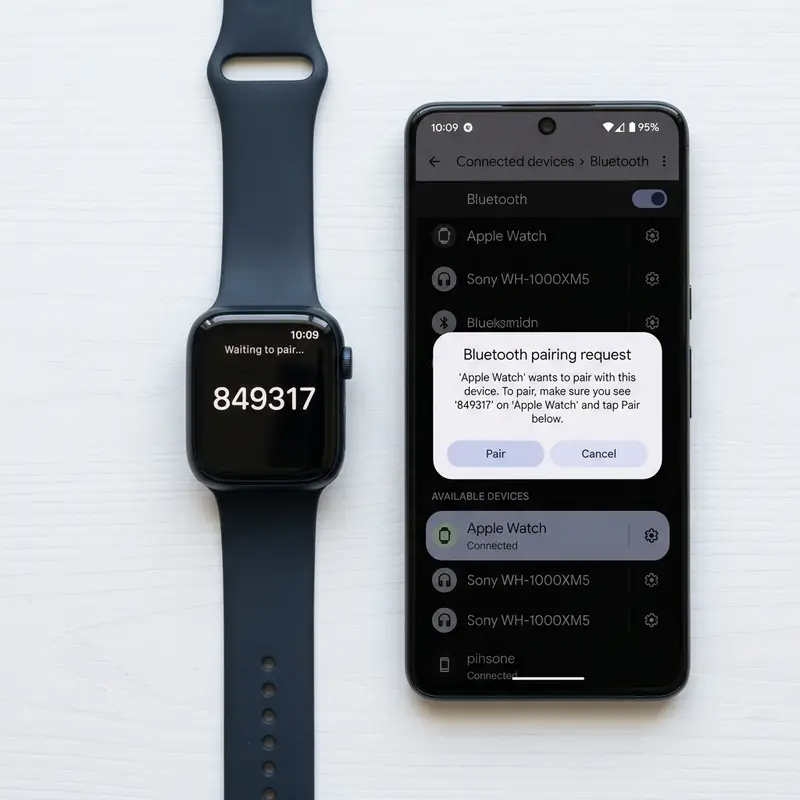
How to Pair and Connect Samsung Galaxy Watch with iPhone
Interoperability between competing tech ecosystems has always been a major limitation for consumers. In the smartwatch market, pairing a Samsung Galaxy Watch with an Apple iPhone is a classic example of this challenge. If you own an iPhone but prefer the aesthetics or hardware design of Samsung's smartwatches, it is important to understand that compatibility depends heavily on the specific model of Galaxy Watch you own.
To connect and pair a Samsung Galaxy Watch with an iPhone, you should know that official support is limited to older Tizen-based models—such as the Galaxy Watch Active 2 and Galaxy Watch 3—using the official Samsung Galaxy Watch (Gear S) app on iOS. For newer WearOS models (Galaxy Watch 4, 5, 6, 7, and Ultra), there is no official app or support for iOS. To pair these newer watches with an iPhone, you must use alternative third-party connection tools like the Merge app over Bluetooth. Understanding these system limitations will help you connect your devices successfully.
If you want to configure other smart devices in your home, check out our technical tutorials on como conectar alexa no computador pc or read about managing mobile network settings in our guide on como ativar esim iphone.
1. The OS Divide: Tizen OS vs. Google WearOS
Before spending time downloading apps, you must identify the operating system running on your Galaxy Watch. Samsung used its proprietary Tizen OS for all smartwatches released up to 2020. Starting with the Galaxy Watch 4 in 2021, Samsung shifted to Google's WearOS platform (featuring the One UI Watch skin). This shift changed the compatibility and pairing rules for iOS users.
Older models (Tizen OS) are fully supported on iOS through Samsung's official app. This app lets you manage notifications, sync sleep data to Apple Health, and customize watch faces. In contrast, WearOS models require background services and Google Play integrations that do not exist on iOS, preventing official compatibility.
2. Pairing Tizen OS Watches via the Official iOS App
If you own a Galaxy Watch 3, Galaxy Watch Active 2, or an older model, the setup process is straightforward and supported by Samsung.
To connect your Tizen watch to your iPhone:
- Ensure Bluetooth is enabled in your iPhone's Settings menu.
- Open the App Store on your iPhone and download the Samsung Galaxy Watch (Gear S) app.
- Power on your Galaxy Watch and ensure it is on the initial setup screen.
- Open the downloaded app on your iPhone and tap Start the Journey.
- Select your matching watch model from the list of detected Bluetooth devices.
- Verify the pairing codes displayed on both screens.
- Grant all requested permissions for notifications, calendar, and contacts to ensure features like call notifications work correctly.
3. Galaxy Watch & iOS Compatibility Chart
| Galaxy Watch Model | Operating System | iOS Compatibility Status | Pairing Method |
|---|---|---|---|
| Galaxy Watch (Original), Gear S3 | Tizen OS | Officially Supported | Galaxy Watch (Gear S) app from App Store |
| Active 1 & Active 2, Watch 3 | Tizen OS | Officially Supported | Galaxy Watch (Gear S) app from App Store |
| Galaxy Watch 4 & Watch 4 Classic | WearOS (Google) | Unofficially Supported | Third-party app (Merge) via BLE |
| Galaxy Watch 5, 5 Pro, 6, 6 Classic | WearOS (Google) | Unofficially Supported | Third-party app (Merge) via BLE |
| Galaxy Watch 7, Watch Ultra (2024+) | WearOS (Google) | Unofficially Supported | Third-party app (Merge) via BLE |
4. Connecting WearOS Galaxy Watches Using the Merge App
If you own a WearOS model (Galaxy Watch 4, 5, 6, 7, or Ultra), the official Samsung app will not work. However, you can establish a Bluetooth Low Energy (BLE) link using a utility called Merge, which you can install directly on the watch.
Follow these steps for this unofficial connection method:
- First, configure your new Galaxy Watch using a temporary Android device to pass the initial WearOS activation screen (you can use a friend's phone for this step).
- Once the watch is set up, open the Google Play Store directly on your Galaxy Watch screen.
- Search for and install the Merge app on the watch.
- Turn on Bluetooth on your iPhone.
- Open the Merge app on the watch and activate pairing mode.
- On your iPhone, go to Settings > Bluetooth, find your watch in the list, and tap to pair.
- Once connected, the Merge app acts as a bridge to forward incoming iOS notifications to your Galaxy Watch.
5. Functional Limitations of Unofficial iOS Pairing
While the Merge app can display incoming text messages and call alerts on your watch, many advanced features will remain unavailable. Samsung-specific features, such as electrocardiogram (ECG) monitoring, calibrated blood pressure measurements, offline Spotify syncing, and alarm synchronization with the iOS system clock, are not supported due to restrictions in the iOS ecosystem.
6. Apple Notification Center Service (ANCS) Protocol
Displaying iOS notifications on non-Apple systems like WearOS relies on a built-in iOS feature called the Apple Notification Center Service (ANCS). This service broadcasts system alerts (such as message titles and text) over a Bluetooth Low Energy link to authorized accessories. The Merge app uses this protocol to capture and display notification data on the Galaxy Watch UI.
7. Workarounds for Sinking Fitness and Health Logs
If you want to sync steps, sleep, and calorie data from your Galaxy Watch to the Apple Health app, you can use a cloud-based workaround. Set up a Samsung Health account and sync your watch data to the Samsung Cloud using an Android phone. You can then use tools like Health Sync on Android to export the records, or manually upload them to your iPhone's Apple Health app.
8. Troubleshooting Bluetooth Disconnections on iOS
Due to the background app refresh restrictions on iOS, Bluetooth Low Energy connections with non-MFi certified apps may be closed by the operating system after periods of inactivity. To help maintain a stable connection, disable Background App Refresh limits for the companion app on your iPhone and keep the Bluetooth connection active on both devices.
Interactive Notification Barriers and Sideload Restrictions on iOS
Pairing a Samsung Galaxy Watch with an Apple iPhone introduces several functional limitations due to iOS security structures. While standard alerts for text messages, WhatsApp, and social media display on the watch face, iOS prevents WearOS and Tizen companion apps from responding directly to these notifications. Additionally, background health synchronization is restricted; iOS suspends inactive background apps, meaning you must open the Samsung Health app manually on your iPhone to transfer heart rate logs and workout history.
Enabling Background Permissions to Stabilize the Bluetooth Link
To maintain a reliable connection between your Galaxy Watch and iPhone, you must grant broad access permissions within iOS Settings. Navigate to the app permissions menu for your Samsung wearable app and set Location Access to 'Always' and enable Background App Refresh. This keeps iOS from putting the companion app to sleep, preventing frequent Bluetooth disconnections and ensuring that weather, calendar events, and notifications sync correctly throughout the day.
Bridging Samsung Health and Apple Health Data Repositories
To ensure your activity stats appear in your iOS health rings, you must establish data paths between Samsung Health and Apple Health. In the iOS Settings app under Health > Data Access & Devices, select Samsung Health and enable all categories. This permission allows the companion app to write activity metrics, active energy, and sleep analysis directly to Apple's Health database.
Important Hardware Limitations for WearOS-Based Galaxy Watches
It is vital to note that Galaxy Watch models running Google's WearOS (Galaxy Watch 4, 5, 6, and newer) are incompatible with iOS. The modern Galaxy Wearable app on iOS only supports older Tizen OS models (like the Galaxy Watch 3 and Active series). iPhone users looking to connect a Samsung smartwatch must utilize these Tizen models or select alternative cross-platform wearables.
Understanding Reflective Optical Spectroscopy in SpO2 Pulse Sensors
The blood oxygen saturation (SpO2) sensor in modern wearables uses reflective optical spectroscopy. The sensor emits red light (approx. 660 nanometers) and infrared light (approx. 940 nanometers) through the skin. Oxygenated hemoglobin absorbs more infrared light, whereas deoxygenated hemoglobin absorbs more red light. By calculating the ratio of reflected light captured by the photodiode array, the onboard processor estimates blood oxygen saturation levels.
Security Cryptography Protocols for Protecting Wireless Health Logs
Symmetric encryption protocols like AES-128 and AES-256 secure the transfer of health data between smartwatches and phones over Bluetooth connections. Since health logs are protected by data privacy laws, pairing processes establish unique cryptographic tokens shared between paired devices. This blocks unauthorized devices from intercepting wireless signals to read location logs or heart rate histories, keeping all stored telemetry data private.
Compiler Optimizations and Application Execution in Resource-Constrained Environments
To run applications smoothly on limited smartwatch hardware, developer suites use Ahead-of-Time (AOT) compilation. This converts source code into native machine code instructions before application launch, reducing CPU cycles during runtimes. Wearable operating systems like WearOS also use layout optimizers to make sure rendering circular UI elements does not overload system RAM, preventing lag when running media players.
The Role of MEMS Accelerometers in Complex Motion Tracking
Micro-Electromechanical Systems (MEMS) accelerometers built into modern smartwatches measure linear acceleration along three orthogonal axes. These tiny silicon components detect minute voltage shifts generated by the swing of a user's arm. Proprietary sensor-fusion algorithms analyze these analog signals and apply Fourier transforms to filter out environmental vibrations, such as typing or driving. This mechanical parsing prevents the system from logging false steps, saving processing cycles for the main CPU cores and drastically reducing battery drain during standby periods.
Chemical Degradation of Lithium-Ion Batteries Under Thermal Stress
Small-scale lithium-ion cells used in wearable electronics undergo rapid physical degradation when subjected to persistent heat. The chemical charging cycle generates internal resistance that, if not radiated through the aluminum or ceramic case, damages the solid electrolyte interphase (SEI) layer. This reduces the anode's ability to host lithium ions. Furthermore, utilizing low-quality chargers that introduce voltage spikes accelerates lithium plating on the electrodes, increasing the risk of cell swelling and sudden battery drops.
The Evolution of Bluetooth Low Energy (BLE) Protocol Implementations
Bluetooth Low Energy (BLE) has changed how smartwatches sync telemetry logs with mobile hosts by prioritizing energy conservation over high-bandwidth transfers. BLE keeps the radio transceiver in a low-power sleep state, waking it up to broadcast small health telemetry packets during brief connection intervals. If a mobile operating system alters these connection intervals, it can cause delayed notification deliveries on the watch face or disrupt the wireless connection entirely.
Applying Kalman Filters to Sensor Fusion for Clean Heart Rate Tracking
Optical photoplethysmography and motion sensor data are merged in real time using Kalman filters and sensor-fusion algorithms. This mathematics calculates the user's pulse rate by subtracting motion-induced noise, such as the impact of steps during running. Without this dynamic noise filtering, the optical sensor's LED feedback would be corrupt, showing inaccurate spikes that would throw off estimations of physical stress, VO2 max metrics, and recovery estimates.
Frequently Asked Questions (FAQ)
1. Is the Galaxy Wearable app available on the iOS App Store?
No, the Galaxy Wearable app used to manage WearOS watches is not available on iOS. Only the older Galaxy Watch (Gear S) app is available, which only supports Tizen-based watches.
2. Can I answer phone calls on a Galaxy Watch paired with an iPhone?
On older Tizen models with official app support, you can make and answer calls directly from the watch. On newer WearOS models connected via the Merge app, you will receive call alerts on the screen but must answer using your iPhone.
3. Does Siri work on a Galaxy Watch paired with an iPhone?
No, the Galaxy Watch only supports Samsung's Bixby or Google Assistant. There is no system integration to trigger Siri using the watch's microphone.
4. How do I update my Galaxy Watch firmware when paired with an iPhone?
For WearOS watches, connect the watch directly to a stable Wi-Fi network and check for updates by going to Settings > Software Update directly on the watch screen.
5. Is it worth buying a Galaxy Watch to use with an iPhone?
Generally, it is not recommended. Because many health tracking and smart features are unavailable on iOS, an Apple Watch is the best choice for iPhone users looking for a fully integrated experience.




